
Article Categories
- All Categories
-
 Data Structure
-
 Networking
-
 RDBMS
RDBMS
-
 Operating System
-
 Java
Java
-
 MS Excel
-
 iOS
iOS
-
 HTML
HTML
-
 CSS
CSS
-
 Android
-
 Python
-
 C Programming
-
 C++
C++
-
 C#
C#
-
 MongoDB
-
 MySQL
MySQL
-
 Javascript
-
 PHP
PHP
-
 Economics & Finance
Selected Reading
Get the path of the file selected in the JFileChooser component with Java
To get the path of the selected file, at first get the selected file −
java.io.File f = file.getSelectedFile();
Now, get the path of the selected file which we will get using the above method −
System.err.println(f.getPath());
The following is an example to get the path of the file selected in the JFileChooser component −
Example
package my;
import javax.swing.JFileChooser;
public class SwingDemo {
   public static void main(String[] args) {
      JFileChooser file = new JFileChooser();
      file.setMultiSelectionEnabled(true);
      file.setFileSelectionMode(JFileChooser.FILES_AND_DIRECTORIES);
      file.setFileHidingEnabled(false);
      if (file.showOpenDialog(null) == JFileChooser.APPROVE_OPTION) {
         java.io.File f = file.getSelectedFile();
         System.err.println(f.getPath());
      }
   }
}
Output
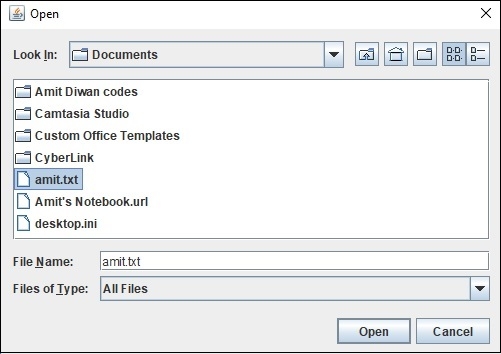
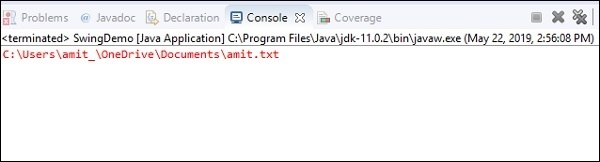
On clicking “Open” above, the path of the selected file is displayed in the Console −

Updated on: 2019-07-30T22:30:26+05:30
2K+ Views

Advertisements