
Article Categories
- All Categories
-
 Data Structure
-
 Networking
-
 RDBMS
RDBMS
-
 Operating System
-
 Java
Java
-
 MS Excel
-
 iOS
iOS
-
 HTML
HTML
-
 CSS
CSS
-
 Android
-
 Python
-
 C Programming
-
 C++
C++
-
 C#
C#
-
 MongoDB
-
 MySQL
MySQL
-
 Javascript
-
 PHP
PHP
-
 Economics & Finance
Selected Reading
Can we set JOptionPane with predefined selection in Java?
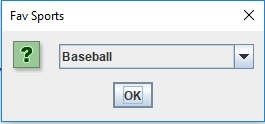
For predefined selection, use the setSelectedIndex() method, wherein you need to set the index of the item you want to be visible first.
Let’s say the following is our aComboBox with elements −
Object[] sports = { "Football", "Cricket", "Squash", "Baseball", "Fencing", "Volleyball", "Basketball" };
JComboBox comboBox = new JComboBox(sports);
Now, set the initial selection with the index of the item −
comboBox.setSelectedIndex(3);
The following is an example to set JOptionPane with predefined selection in Java −
Example
package my;
import java.awt.GridBagLayout;
import javax.swing.JComboBox;
import javax.swing.JOptionPane;
import javax.swing.JPanel;
public class SwingDemo {
   public static void main(String[] args) throws Exception {
      JPanel panel = new JPanel(new GridBagLayout());
      Object[] sports = { "Football", "Cricket", "Squash", "Baseball", "Fencing", "Volleyball", "Basketball" };
      JComboBox comboBox = new JComboBox(sports);
      // initial selection
      comboBox.setSelectedIndex(3);
      JOptionPane.showMessageDialog(null, comboBox, "Fav Sports",
      JOptionPane.QUESTION_MESSAGE);
      panel.add(comboBox);
   }
}
Output

Updated on: 2019-07-30T22:30:26+05:30
384 Views

Advertisements