
Article Categories
- All Categories
-
 Data Structure
-
 Networking
-
 RDBMS
RDBMS
-
 Operating System
-
 Java
Java
-
 MS Excel
-
 iOS
iOS
-
 HTML
HTML
-
 CSS
CSS
-
 Android
-
 Python
-
 C Programming
-
 C++
C++
-
 C#
C#
-
 MongoDB
-
 MySQL
MySQL
-
 Javascript
-
 PHP
PHP
-
 Economics & Finance
Generation of .HEX file using a linker
The file MULT.ASM which is created by using an editor is simply a text file. We cannot execute this file directly. At first we have to assemble the file, and then we have to link it. The step of assembly the translation of the program of assembly language to machine code requires the generation of a .OBJ file.
Now a .HEX file is generated by using a linker. We have seen previously that how the naming of the input and output file is done.
Input filename
The source name of the file must be responded by the user. In the given example the user must respond to ‘MULT.ASM’. MULT is also sufficient to carry out the task. After that the user is prompted by the assembler for the name of the output file which is as follows:
Output filename
The user responding with the change of address ‘
Prompt mode − In this mode we just change the address. Moreover, it is beneficial for us to respond by typing “T” which results only on terminal listing.
Data file mode
Command line mode
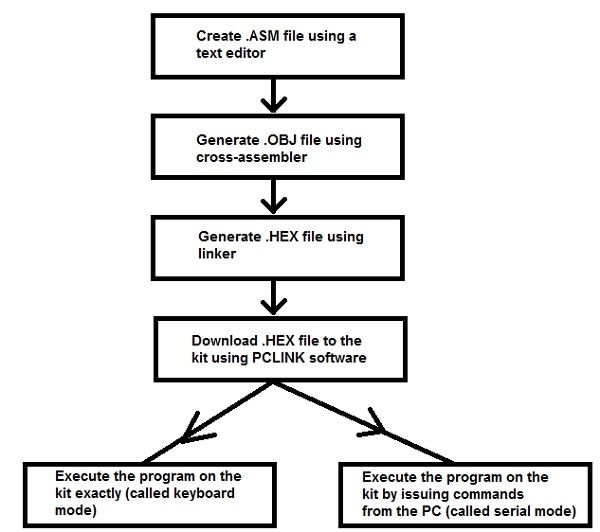
Following diagram depicts the steps required to execute .ASM program execution –

780 Views
