
Article Categories
- All Categories
-
 Data Structure
-
 Networking
-
 RDBMS
RDBMS
-
 Operating System
-
 Java
Java
-
 MS Excel
-
 iOS
iOS
-
 HTML
HTML
-
 CSS
CSS
-
 Android
-
 Python
-
 C Programming
-
 C++
C++
-
 C#
C#
-
 MongoDB
-
 MySQL
MySQL
-
 Javascript
-
 PHP
PHP
-
 Economics & Finance
Selected Reading
Fetch all href link using selenium in python.
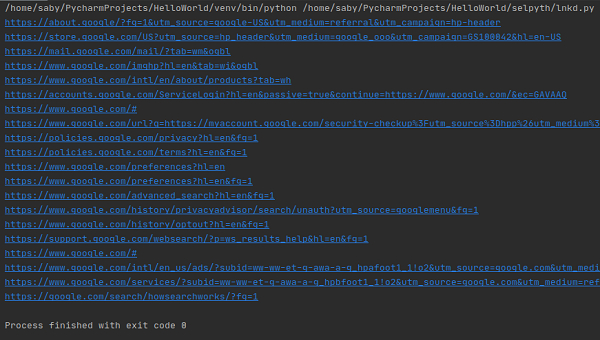
We can fetch href links in a page in Selenium by using the method find_elements(). All the links in the webpage are designed in a html document such that they are enclosed within the anchor tag.
To fetch all the elements having

Example
Code Implementation.
from selenium import webdriver
driver = webdriver.Chrome (executable_path="C:\chromedriver.exe")
driver.maximize_window()
driver.get("https://www.google.com/")
# identify elements with tagname <a>
lnks=driver.find_elements_by_tag_name("a")
# traverse list
for lnk in lnks:
   # get_attribute() to get all href
   print(lnk.get_attribute(href))
driver.quit()
Output

Updated on: 2020-08-28T12:20:29+05:30
22K+ Views

Advertisements