
Article Categories
- All Categories
-
 Data Structure
-
 Networking
-
 RDBMS
RDBMS
-
 Operating System
-
 Java
Java
-
 MS Excel
-
 iOS
iOS
-
 HTML
HTML
-
 CSS
CSS
-
 Android
-
 Python
-
 C Programming
-
 C++
C++
-
 C#
C#
-
 MongoDB
-
 MySQL
MySQL
-
 Javascript
-
 PHP
PHP
-
 Economics & Finance
Eroding an image using the OpenCV function erode()
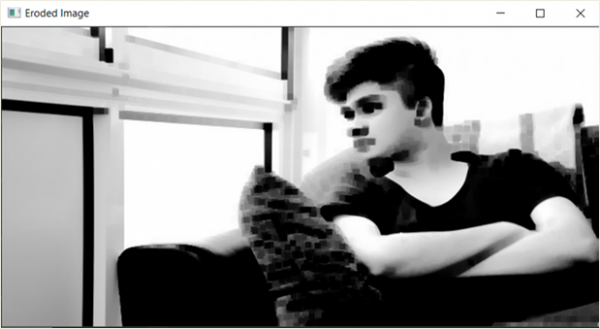
In this program, we will erode an image using the OpenCV function erode(). Erosion of an image means to shrink the image by reducing the size of white regions or foreground objects. If any of the pixels in a kernel is 0, then all the pixels in the kernel are set to 0. One condition before applying an erosion function on an image is that the image should be a grayscale image.
What is Image Erosion?
Image erosion is a morphological operation that reduces the boundaries of foreground objects (white pixels). It works by sliding a structuring element (kernel) across the image and replacing the center pixel with the minimum value in the kernel region.
Original Image

Algorithm
Step 1: Import cv2
Step 2: Import numpy
Step 3: Read the image using imread()
Step 4: Convert to grayscale if needed
Step 5: Define the kernel size using numpy ones
Step 6: Pass the image and kernel to the erode function
Step 7: Display the output
Example Code
import cv2
import numpy as np

# Read the image
image = cv2.imread('testimage.jpg')

# Convert to grayscale
gray_image = cv2.cvtColor(image, cv2.COLOR_BGR2GRAY)

# Define kernel (structuring element)
kernel = np.ones((7,7), np.uint8)

# Apply erosion
eroded_image = cv2.erode(gray_image, kernel, iterations=1)

# Display the results
cv2.imshow('Original Image', gray_image)
cv2.imshow('Eroded Image', eroded_image)
cv2.waitKey(0)
cv2.destroyAllWindows()
Understanding the Parameters
The cv2.erode() function accepts the following key parameters ?
- src − Input image (preferably grayscale)
- kernel − Structuring element for erosion
- iterations − Number of times erosion is applied (default is 1)
Different Kernel Sizes
import cv2
import numpy as np

image = cv2.imread('testimage.jpg', 0)  # Read as grayscale

# Different kernel sizes
kernel_3x3 = np.ones((3,3), np.uint8)
kernel_5x5 = np.ones((5,5), np.uint8)
kernel_9x9 = np.ones((9,9), np.uint8)

# Apply erosion with different kernels
eroded_3x3 = cv2.erode(image, kernel_3x3)
eroded_5x5 = cv2.erode(image, kernel_5x5)
eroded_9x9 = cv2.erode(image, kernel_9x9)

# Display results
cv2.imshow('Original', image)
cv2.imshow('Eroded 3x3', eroded_3x3)
cv2.imshow('Eroded 5x5', eroded_5x5)
cv2.imshow('Eroded 9x9', eroded_9x9)
cv2.waitKey(0)
cv2.destroyAllWindows()
Output
Key Points
- Larger kernels produce more erosion effect
- Erosion removes noise but also shrinks objects
- Multiple iterations can be applied for stronger effects
- Works best on binary or grayscale images
Conclusion
Image erosion using cv2.erode() is effective for removing noise and shrinking foreground objects. The kernel size determines the intensity of the erosion effect, with larger kernels producing more dramatic results.

807 Views
