
Article Categories
- All Categories
-
 Data Structure
-
 Networking
-
 RDBMS
RDBMS
-
 Operating System
-
 Java
Java
-
 MS Excel
-
 iOS
iOS
-
 HTML
HTML
-
 CSS
CSS
-
 Android
-
 Python
-
 C Programming
-
 C++
C++
-
 C#
C#
-
 MongoDB
-
 MySQL
MySQL
-
 Javascript
-
 PHP
PHP
-
 Economics & Finance
Selected Reading
Email & Phone Validation in Swift
To validate email and phone in swift language we can use multiple conditional statements like if conditions, but that’s a long process and may contain 50-100s of if statements to validate email.
So instead of conditionals we’ll use Regular expression. Swift provides NSPredicates which we can use to evaluate a regular expression and test them.
Let’s see how we can use regular expressions to do the same.
We’ll create a function which we can use as extension of String class or UIViewController to use through out the project.
Add the following code to any class in your Project, or create a separate swift class to add extension.
extension String {
   var isValidEmail: Bool {
      let regularExpressionForEmail = "[A-Z0-9a-z._%+-]+@[A-Za-z0-9.-]+\.[A-Za-z]{2,64}"
      let testEmail = NSPredicate(format:"SELF MATCHES %@", regularExpressionForEmail)
      return testEmail.evaluate(with: self)
   }
   var isValidPhone: Bool {
      let regularExpressionForPhone = "^\d{3}-\d{3}-\d{4}$"
      let testPhone = NSPredicate(format:"SELF MATCHES %@", regularExpressionForPhone)
      return testPhone.evaluate(with: self)
   }
}
The same can be used like
override func viewDidLoad() {
   super.viewDidLoad()
   print("11f".isValidEmail)
   print("abc@xuyz.com".isValidEmail)
   print("8892".isValidPhone)
   print("998-877-2211".isValidPhone)
}
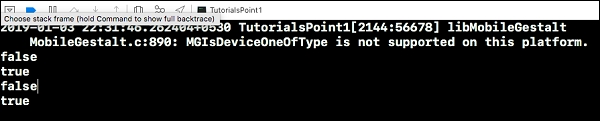
When we run the above code, we get the following output.
false
true
false
true

Updated on: 2019-07-30T22:30:24+05:30
2K+ Views

Advertisements