
Article Categories
- All Categories
-
 Data Structure
-
 Networking
-
 RDBMS
RDBMS
-
 Operating System
-
 Java
Java
-
 MS Excel
-
 iOS
iOS
-
 HTML
HTML
-
 CSS
CSS
-
 Android
-
 Python
-
 C Programming
-
 C++
C++
-
 C#
C#
-
 MongoDB
-
 MySQL
MySQL
-
 Javascript
-
 PHP
PHP
-
 Economics & Finance
Configure tkinter/ttk widgets with transparent backgrounds
Tkinter provides the ability to create widgets with transparent backgrounds using the wm_attributes() method. The wm_attributes('-transparentcolor', 'color') method makes all pixels of a specified color completely transparent in your window.
How Transparent Background Works
The wm_attributes('-transparentcolor', color) method tells the window manager to treat all pixels of the specified color as transparent. Any widget or background area using that exact color will become see-through, revealing whatever is behind the window.
Example
Here's how to create a Label widget with a transparent background ?
# Import the required libraries
from tkinter import *

# Create an instance of Tkinter Frame
win = Tk()

# Set the geometry
win.geometry("700x350")

# Adding transparent background property
win.wm_attributes('-transparentcolor', '#ab23ff')

# Create a Label with the transparent color as background
Label(win, text="Hello World!", font=('Helvetica', 18), bg='#ab23ff').pack(ipadx=50, ipady=50, padx=20)

win.mainloop()
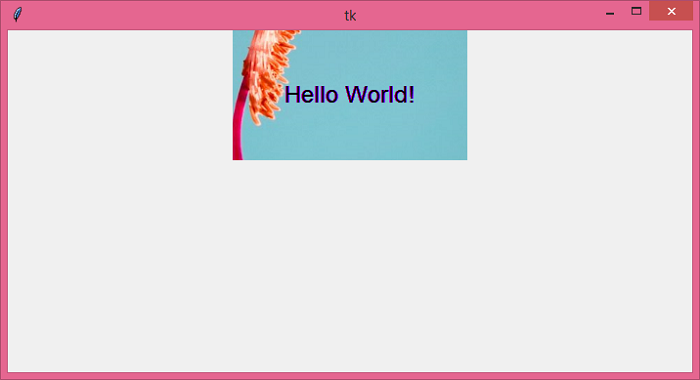
Output
Running the above code will display a window where the Label appears to float without a visible background ?
Multiple Transparent Elements
You can create multiple widgets with transparent backgrounds using the same color ?
from tkinter import *

win = Tk()
win.geometry("600x400")

# Set transparent color
transparent_color = '#ff0000'  # Red color will be transparent
win.wm_attributes('-transparentcolor', transparent_color)

# Create multiple widgets with transparent backgrounds
Label(win, text="Transparent Label 1", font=('Arial', 14), bg=transparent_color).pack(pady=20)
Label(win, text="Transparent Label 2", font=('Arial', 14), bg=transparent_color).pack(pady=20)

# Non-transparent widget
Label(win, text="Solid Background", font=('Arial', 14), bg='white').pack(pady=20)

win.mainloop()
Key Points
- Only one color can be set as transparent per window
- The transparent color must match exactly ? slight variations won't work
- This feature works on Windows; behavior may vary on other platforms
- Widgets with different background colors will remain visible
Conclusion
Use wm_attributes('-transparentcolor', color) to create transparent backgrounds in Tkinter. Set widget backgrounds to the same transparent color to make them see-through, creating floating text effects.

6K+ Views
