
Article Categories
- All Categories
-
 Data Structure
-
 Networking
-
 RDBMS
RDBMS
-
 Operating System
-
 Java
Java
-
 MS Excel
-
 iOS
iOS
-
 HTML
HTML
-
 CSS
CSS
-
 Android
-
 Python
-
 C Programming
-
 C++
C++
-
 C#
C#
-
 MongoDB
-
 MySQL
MySQL
-
 Javascript
-
 PHP
PHP
-
 Economics & Finance
Selected Reading
Avoid placing password on command line with MySQL Utilities?
First you need to reach the location of “my.cnf” with the help of below query for MySQL Utilities. The query is as follows −
mysql> select @@datadir;
The following is the output that display where “my.conf” is −
+---------------------------------------------+
| @@datadir                                   |
+---------------------------------------------+
| C:\ProgramData\MySQL\MySQL Server 8.0\Data\ |
+---------------------------------------------+
1 row in set (0.00 sec)
Follow the above path in order to open the “my.cnf” file. The snapshot of “my.cnf” location is as follows −
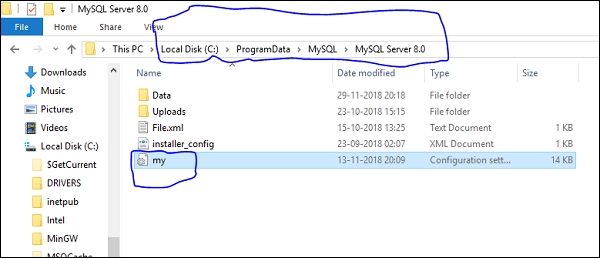
Now you can put the below MySQL Utilities in my.cnf which is as follows −
[client]
user = root
password = "yourPassword"

[mysql]
user = root
password = "yourPassword"

[mysqldiff]
user = root
password = "yourPassword"

[mysqldump]
user = root
password = "yourPassword"

Updated on: 2020-06-29T08:04:20+05:30
326 Views

Advertisements