
Article Categories
- All Categories
-
 Data Structure
-
 Networking
-
 RDBMS
RDBMS
-
 Operating System
-
 Java
Java
-
 MS Excel
-
 iOS
iOS
-
 HTML
HTML
-
 CSS
CSS
-
 Android
-
 Python
-
 C Programming
-
 C++
C++
-
 C#
C#
-
 MongoDB
-
 MySQL
MySQL
-
 Javascript
-
 PHP
PHP
-
 Economics & Finance
Animate a rotating 3D graph in Matplotlib
To create an animated rotating 3D graph in Matplotlib, we can use the Animation class to repeatedly call a function that updates the plot. This creates smooth animation effects by changing the plot parameters over time.
Steps to Create 3D Animation
Initialize variables for mesh grid size, animation speed (fps), and number of frames
Create coordinate arrays (x, y) using meshgrid for the 3D surface
Define a mathematical function to generate varying z-values over time
Create a 3D array to store z-values for each animation frame
Define an update function that removes the previous plot and draws a new surface
Create a 3D subplot using
projection='3d'Set axis limits and use FuncAnimation to animate the plot
Display the animation using
show()method
Example
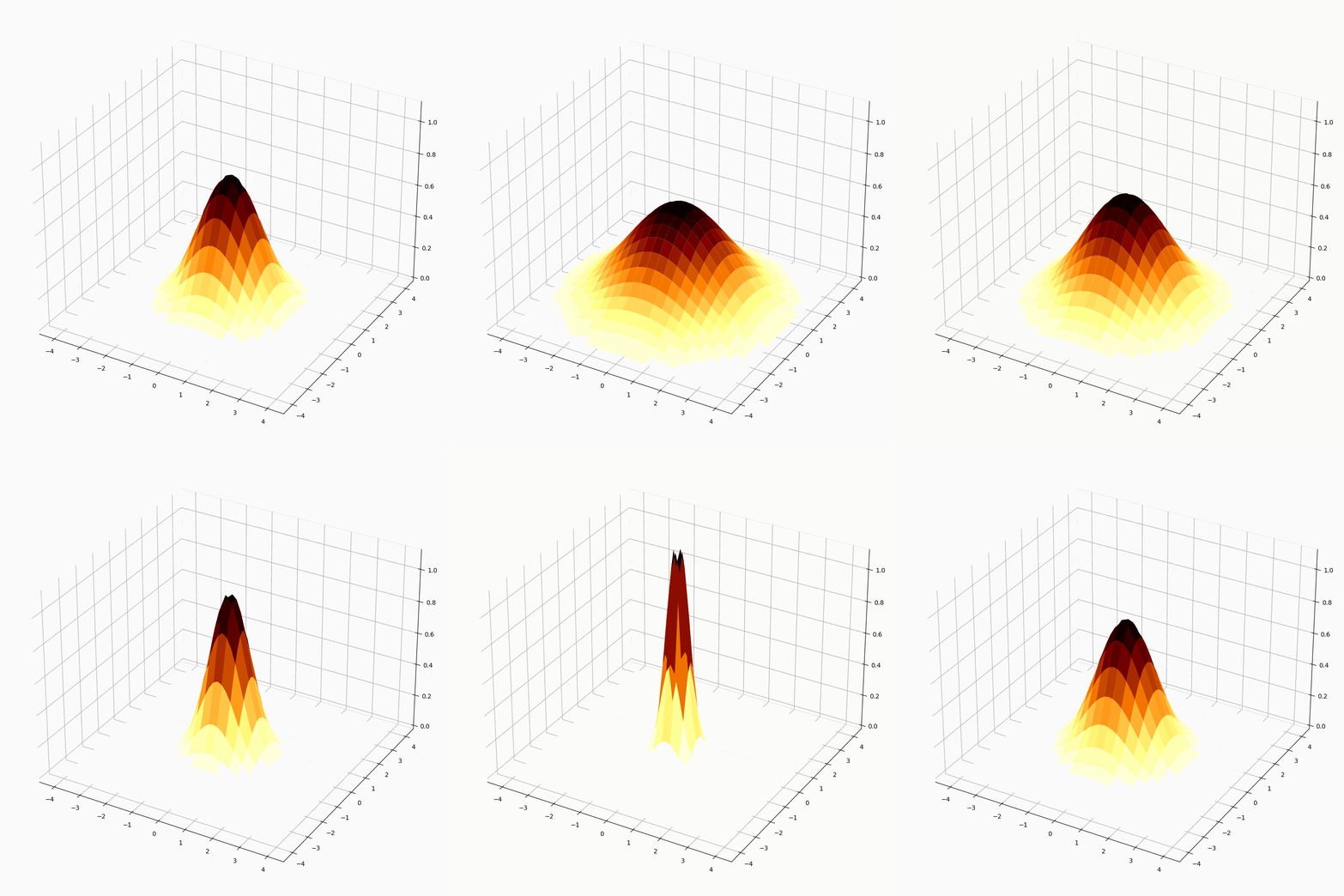
Let's create an animated 3D surface that changes shape over time using a Gaussian function ?
import numpy as np
import matplotlib.pyplot as plt
import matplotlib.animation as animation

plt.rcParams["figure.figsize"] = [7.00, 3.50]
plt.rcParams["figure.autolayout"] = True

# Animation parameters
N = 50
fps = 250
frn = 75

# Create coordinate arrays
x = np.linspace(-4, 4, N + 1)
x, y = np.meshgrid(x, x)
zarray = np.zeros((N + 1, N + 1, frn))

# Define function for varying surface
f = lambda x, y, sig: 1 / np.sqrt(sig) * np.exp(-(x ** 2 + y ** 2) / sig ** 2)

# Generate z-values for each frame
for i in range(frn):
    zarray[:, :, i] = f(x, y, 1.5 + np.sin(i * 2 * np.pi / frn))

# Function to update the plot
def change_plot(frame_number, zarray, plot):
    plot[0].remove()
    plot[0] = ax.plot_surface(x, y, zarray[:, :, frame_number], cmap="afmhot_r")

# Create figure and 3D subplot
fig = plt.figure()
ax = fig.add_subplot(111, projection='3d')

# Initial plot
plot = [ax.plot_surface(x, y, zarray[:, :, 0], color='0.75', rstride=1, cstride=1)]
ax.set_zlim(0, 1.1)

# Create animation
ani = animation.FuncAnimation(fig, change_plot, frn, fargs=(zarray, plot), interval=1000 / fps)

plt.show()
Output
The above code generates an animated 3D surface that continuously changes its shape, creating a pulsating effect. The surface uses a colormap for better visualization.
How It Works
The animation works by:
Meshgrid Creation:
np.meshgrid()creates coordinate matrices for 3D plottingFunction Definition: The lambda function generates a Gaussian surface that varies with parameter
sigFrame Generation: A loop pre-computes z-values for all animation frames
Update Function:
change_plot()removes the old surface and plots a new oneFuncAnimation: Calls the update function repeatedly at specified intervals
Key Parameters
fps: Controls animation speed (frames per second)
frn: Total number of animation frames
interval: Time delay between frames in milliseconds
cmap: Color map for the surface ("afmhot_r" for heat-like colors)
Conclusion
Matplotlib's FuncAnimation enables smooth 3D animations by repeatedly updating plot surfaces. Pre-computing frame data and using efficient update functions ensures smooth playback performance.

2K+ Views
