
Article Categories
- All Categories
-
 Data Structure
-
 Networking
-
 RDBMS
RDBMS
-
 Operating System
-
 Java
Java
-
 MS Excel
-
 iOS
iOS
-
 HTML
HTML
-
 CSS
CSS
-
 Android
-
 Python
-
 C Programming
-
 C++
C++
-
 C#
C#
-
 MongoDB
-
 MySQL
MySQL
-
 Javascript
-
 PHP
PHP
-
 Economics & Finance
Identify SQVI queries formed by a user in SAP project
You need to use the function RSAQ_REMOTE_QUERY_CALL_CATALOG for fetching the list of SQVI queries for a user in SAP. This function module allows you to retrieve information about queries created in the SAP Query (SQVI) transaction.
Understanding RSAQ_REMOTE_QUERY_CALL_CATALOG Function
The RSAQ_REMOTE_QUERY_CALL_CATALOG function module is designed to programmatically access the catalog of SQVI queries. It provides details about queries created by specific users, including query names, descriptions, and associated parameters.
Example Implementation
Here's how to implement this function to retrieve SQVI queries for a specific user ?
DATA: lt_query_catalog TYPE STANDARD TABLE OF rsaqcatalog,
      lv_username      TYPE sy-uname.

lv_username = 'USERNAME'. " Replace with actual username

CALL FUNCTION 'RSAQ_REMOTE_QUERY_CALL_CATALOG'
  EXPORTING
    remote_destination = ' '
    username          = lv_username
  TABLES
    query_catalog     = lt_query_catalog
  EXCEPTIONS
    destination_error = 1
    catalog_error     = 2
    OTHERS           = 3.

IF sy-subrc = 0.
  " Process the query catalog
  LOOP AT lt_query_catalog INTO DATA(ls_query).
    WRITE: / 'Query Name:', ls_query-queryname,
           / 'Description:', ls_query-descript.
  ENDLOOP.
ENDIF.
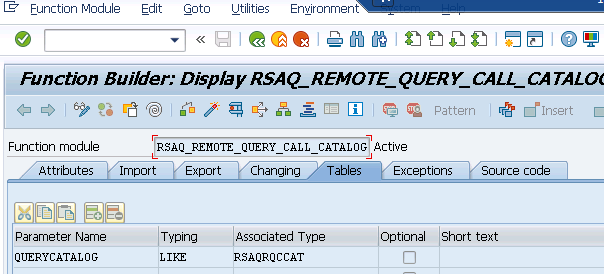
The function returns a table containing query information, including query names, descriptions, and user details. You can then process this data according to your specific requirements for analysis or reporting purposes.
Conclusion
Using RSAQ_REMOTE_QUERY_CALL_CATALOG provides an efficient way to programmatically identify and retrieve SQVI queries created by specific users in your SAP project.

547 Views
