
Article Categories
- All Categories
-
 Data Structure
-
 Networking
-
 RDBMS
RDBMS
-
 Operating System
-
 Java
Java
-
 MS Excel
-
 iOS
iOS
-
 HTML
HTML
-
 CSS
CSS
-
 Android
-
 Python
-
 C Programming
-
 C++
C++
-
 C#
C#
-
 MongoDB
-
 MySQL
MySQL
-
 Javascript
-
 PHP
PHP
-
 Economics & Finance
Export Data from a SAP system
SAP stores data in database structures that are not conventional and quite complex. To export data from a SAP system, you need to develop custom code on top of SAP to support data export to external systems, and you are free to choose the format of your choice.
Using SQVI (Quick Viewer) for Data Export
One effective method to export data from SAP is to identify user-specific SQVI queries in ABAP/BAPI. Quick Viewer (SQVI) is a powerful tool for generating reports and extracting data from SAP tables. SAP Query offers users a comprehensive range of options for defining custom reports that can be exported in various formats.
Transaction Code: SQVI (Quick Viewer)
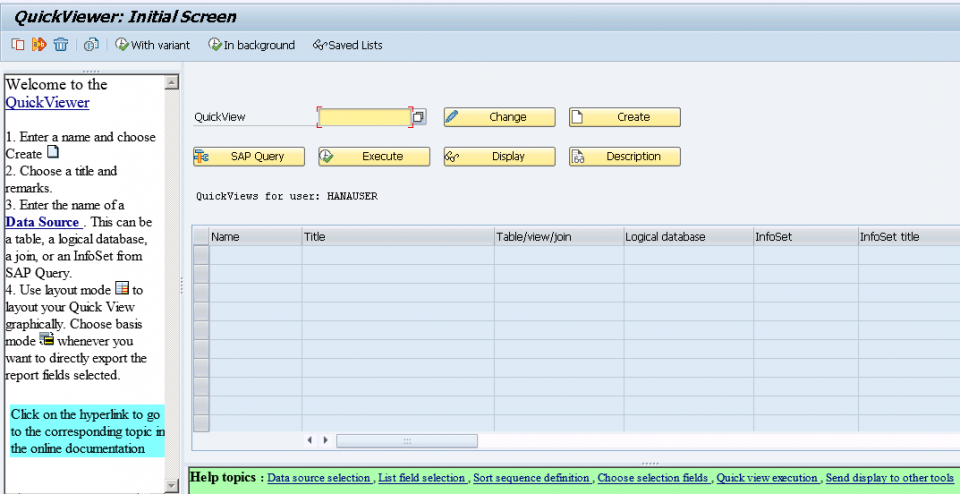
Steps to Export Data Using SQVI
The SQVI transaction allows you to ?
- Select specific database tables and fields
- Define selection criteria and filters
- Generate reports in various output formats
- Export data to external files (Excel, CSV, etc.)
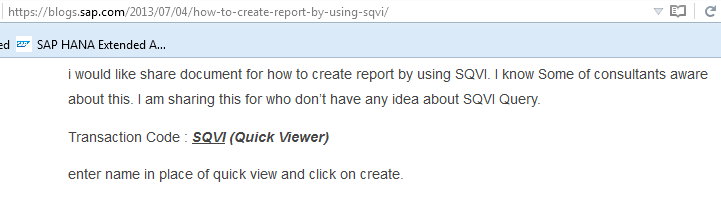
You can check out this link to know more about how to generate reports: Create Report by using SQVI
Alternative Export Methods
Besides SQVI, you can also use other SAP tools for data export including SE16 for table data extraction, SAP Query (SQ01) for complex reporting, and custom ABAP programs with file download functionality.
Conclusion
Exporting data from SAP systems requires understanding the complex database structure and utilizing appropriate tools like SQVI for report generation. The Quick Viewer provides a user-friendly interface for creating custom reports and exporting data in your preferred format.

1K+ Views
