
Article Categories
- All Categories
-
 Data Structure
-
 Networking
-
 RDBMS
RDBMS
-
 Operating System
-
 Java
Java
-
 MS Excel
-
 iOS
iOS
-
 HTML
HTML
-
 CSS
CSS
-
 Android
-
 Python
-
 C Programming
-
 C++
C++
-
 C#
C#
-
 MongoDB
-
 MySQL
MySQL
-
 Javascript
-
 PHP
PHP
-
 Economics & Finance
How to enable JavaScript in Internet Explorer (IE)?
To enable JavaScript in Internet Explorer (IE), you need to modify the browser's security settings. JavaScript is essential for modern web functionality, and enabling it ensures websites work properly.
Step 1: Opening Internet Options
Click the gear icon (Tools menu) located in the top-right corner of the Internet Explorer window:
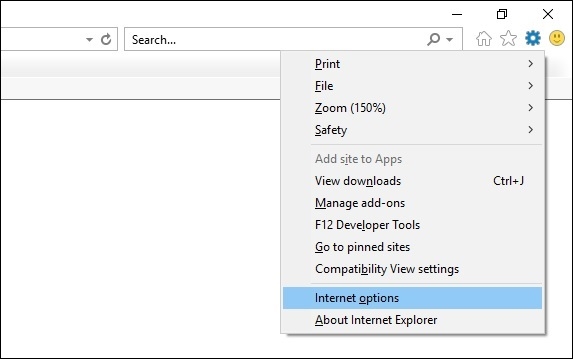
From the dropdown menu, select Internet Options to open the configuration dialog.
Step 2: Navigating to Security Settings
In the Internet Options dialog box, navigate to the Security tab and click the Custom level button:
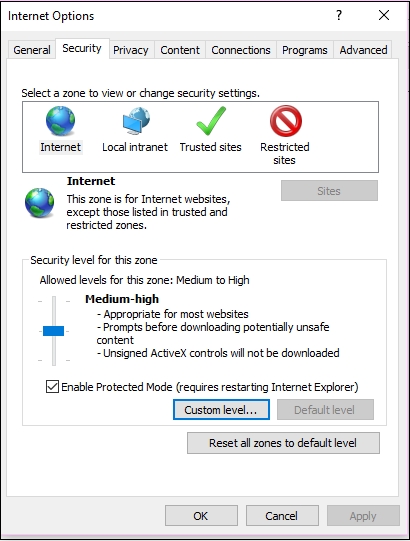
This opens the Security Settings dialog where you can configure various security options for different zones.
Step 3: Enabling Active Scripting
In the Security Settings window, scroll down to find the Scripting section, then locate Active Scripting:

Select the Enable radio button under Active Scripting and click OK to save your changes.
Applying the Changes
After clicking OK, you may see a confirmation dialog asking if you want to change the security settings. Click Yes to confirm. Close the Internet Options dialog by clicking OK again.
Alternative Method: Zone-Based Settings
You can also enable JavaScript for specific security zones:
- Internet zone - for external websites
- Local intranet zone - for company networks
- Trusted sites zone - for explicitly trusted websites
Select the appropriate zone before clicking "Custom level" to configure JavaScript settings for that specific zone only.
Verification
To verify JavaScript is working, visit a website that uses JavaScript functionality or check the browser's developer tools. You may need to restart Internet Explorer for the changes to take full effect.
Conclusion
Enabling JavaScript in Internet Explorer requires accessing the Security Settings through Internet Options and enabling Active Scripting. This process ensures modern web applications function correctly in your browser.

924 Views
