
Article Categories
- All Categories
-
 Data Structure
-
 Networking
-
 RDBMS
RDBMS
-
 Operating System
-
 Java
Java
-
 MS Excel
-
 iOS
iOS
-
 HTML
HTML
-
 CSS
CSS
-
 Android
-
 Python
-
 C Programming
-
 C++
C++
-
 C#
C#
-
 MongoDB
-
 MySQL
MySQL
-
 Javascript
-
 PHP
PHP
-
 Economics & Finance
How to disable JavaScript in Internet Explorer (IE)?
To disable JavaScript in Internet Explorer (IE), you can control script execution through the browser's security settings. This is useful for testing websites without JavaScript or enhancing security in certain environments.
Steps to Disable JavaScript in IE
Follow these steps to disable JavaScript in Internet Explorer:
Step 1: Click the gear icon (Settings) located on the right-hand side of the browser toolbar.

Step 2: From the dropdown menu, select Internet Options. A dialog box will open with multiple tabs.
Step 3: Navigate to the Security tab and click the Custom level button to access detailed security settings.

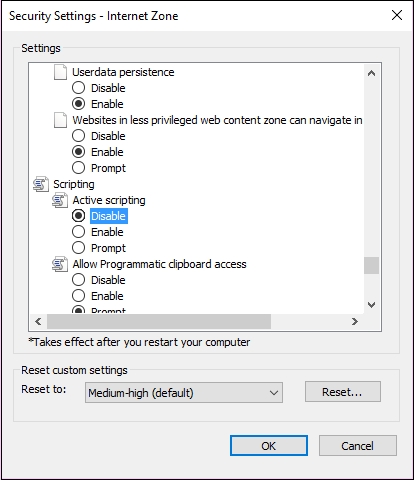
Step 4: In the Security Settings window, scroll down to the Scripting section. Look for the Active scripting option.
Step 5: Select Disable to turn off JavaScript execution, then click OK to apply the changes.
Step 6: Click OK again in the Internet Options dialog to confirm and save your settings.
Testing JavaScript Status
To verify that JavaScript is disabled, visit any website that relies on JavaScript functionality. Interactive elements like dropdown menus, dynamic content, or form validations should no longer work.
Re-enabling JavaScript
To re-enable JavaScript, follow the same steps but select Enable instead of Disable in the Active scripting section.
Important Considerations
Keep in mind that disabling JavaScript will break functionality on most modern websites, as they heavily rely on JavaScript for navigation, forms, and interactive features. Use this setting only when necessary for testing or security purposes.
Conclusion
Disabling JavaScript in Internet Explorer is straightforward through the Security settings. Remember that this will significantly impact website functionality, so re-enable it when normal browsing is needed.

657 Views
