
Article Categories
- All Categories
-
 Data Structure
-
 Networking
-
 RDBMS
RDBMS
-
 Operating System
-
 Java
Java
-
 MS Excel
-
 iOS
iOS
-
 HTML
HTML
-
 CSS
CSS
-
 Android
-
 Python
-
 C Programming
-
 C++
C++
-
 C#
C#
-
 MongoDB
-
 MySQL
MySQL
-
 Javascript
-
 PHP
PHP
-
 Economics & Finance
Selected Reading
Finding location of uploaded file using SAP GUI_upload
When you upload a file using the gui_upload function, the file is not uploaded to the Application server. The file is read from presentation layer to an internal table.
Example
Following code can be used to call a gui_upload function to read the file to an internet table:
lv_filename = p_filebp.
CLEAR lt_data_tab.
IF NOT lv_filename IS INITIAL.
  CALL FUNCTION 'GUI_UPLOAD'
    EXPORTING
      filename = lv_filename
    TABLES
      data_tab = lt_data_tab
    EXCEPTIONS
      file_open_error = 1
      OTHERS = 17.
  IF sy-subrc <> 0.
    EXIT.
  ENDIF.
ENDIF.
You can check if data from a file has been read and transferred to an internal table. Now you can upload this to a file on the Application server.
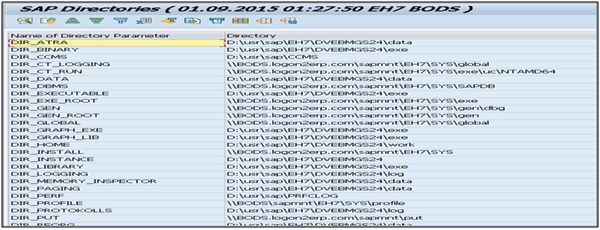
Also, note that you can T-code: AL11 to open existing folders and files in SAP system as below:

Updated on: 2019-12-16T07:44:17+05:30
1K+ Views

Advertisements