
Article Categories
- All Categories
-
 Data Structure
-
 Networking
-
 RDBMS
RDBMS
-
 Operating System
-
 Java
Java
-
 MS Excel
-
 iOS
iOS
-
 HTML
HTML
-
 CSS
CSS
-
 Android
-
 Python
-
 C Programming
-
 C++
C++
-
 C#
C#
-
 MongoDB
-
 MySQL
MySQL
-
 Javascript
-
 PHP
PHP
-
 Economics & Finance
Selected Reading
Executing a table creation using UI in SAP HANA Studio
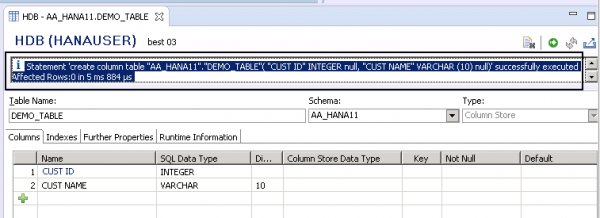
To execute the table creation, click on the green arrow mark on the top right corner. You will get a confirmation as below that a column table has been created in Schema AA_HANA11 with name DEMO_TABLE −
Statement 'create column table "AA_HANA11"."DEMO_TABLE"( "CUST ID" INTEGER null, "CUST NAME" VARCHAR (10) null)' successfully executed Affected Rows:0 in 5 ms 884 µs.

Updated on: 2020-06-22T09:30:13+05:30
351 Views

Advertisements