
Article Categories
- All Categories
-
 Data Structure
-
 Networking
-
 RDBMS
RDBMS
-
 Operating System
-
 Java
Java
-
 MS Excel
-
 iOS
iOS
-
 HTML
HTML
-
 CSS
CSS
-
 Android
-
 Python
-
 C Programming
-
 C++
C++
-
 C#
C#
-
 MongoDB
-
 MySQL
MySQL
-
 Javascript
-
 PHP
PHP
-
 Economics & Finance
Selected Reading
Creating an Attribute view in SAP HANA
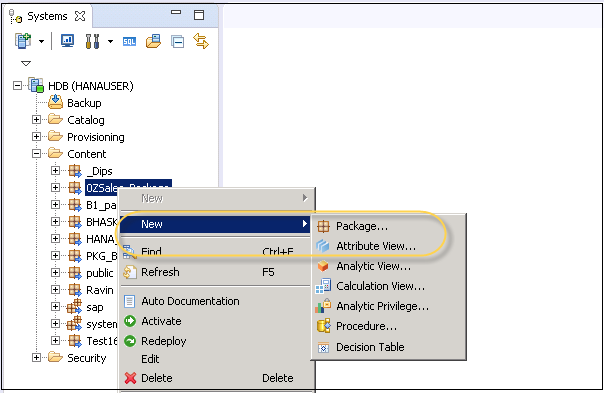
To create a new Attribute view, select the Package name under which you want to create an Attribute View. Right Click on Package → Go to New → Attribute View
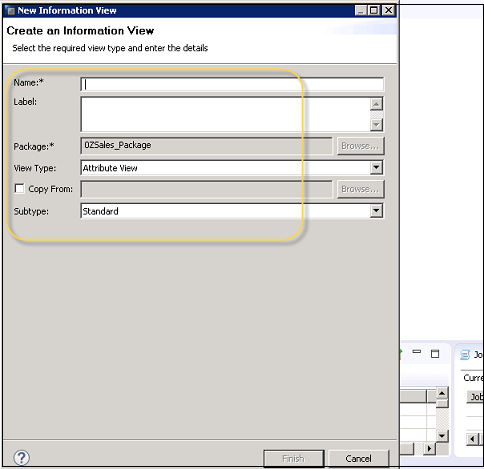
Click on Attribute View, and this will open a new Window. You need to pass Attribute View name and description. From the drop-down list, choose View Type and subtype. In subtype, there are three types of Attribute views − Standard, Time, and Derived.
Once you finish the wizard, you can see view is created under the specified package.

Updated on: 2020-06-18T08:39:48+05:30
380 Views

Advertisements