
Article Categories
- All Categories
-
 Data Structure
-
 Networking
-
 RDBMS
RDBMS
-
 Operating System
-
 Java
Java
-
 MS Excel
-
 iOS
iOS
-
 HTML
HTML
-
 CSS
CSS
-
 Android
-
 Python
-
 C Programming
-
 C++
C++
-
 C#
C#
-
 MongoDB
-
 MySQL
MySQL
-
 Javascript
-
 PHP
PHP
-
 Economics & Finance
Selected Reading
Create Three Equal Columns with Bootstrap grid Layout
To create three equal columns layout with Bootstrap Grid Layout, you can try to run the following code −
Example
<!DOCTYPE html>
<html>
   <head>
      <title>Bootstrap Example</title>
      <link rel="stylesheet" ref="https://maxcdn.bootstrapcdn.com/bootstrap/3.4.1/css/bootstrap.min.css">
      <script src="https://ajax.googleapis.com/ajax/libs/jquery/3.5.1/jquery.min.js"></script>
      <script src="https://maxcdn.bootstrapcdn.com/bootstrap/3.4.1/js/bootstrap.min.js"></script>
   </head>
   <body>
      <div class = "container-fluid">
         <h2>Bootstrap Grid</h2>
         <div class = "row">
            <div class = "col-sm-4" style = "background-color:green; color: white;">Column One</div>
            <div class = "col-sm-4" style = "background-color:orange; color: white;">Column Two</div>
            <div class = "col-sm-4" style = "background-color:gray; color: white;">Column Three</div>
         </div>
      </div>
   </body>
</html>
Output
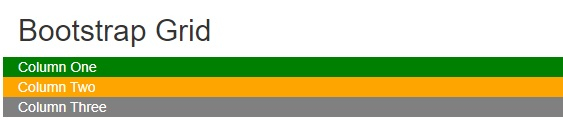

Updated on: 2022-02-09T07:23:05+05:30
1K+ Views

Advertisements