
Article Categories
- All Categories
-
 Data Structure
-
 Networking
-
 RDBMS
RDBMS
-
 Operating System
-
 Java
Java
-
 MS Excel
-
 iOS
iOS
-
 HTML
HTML
-
 CSS
CSS
-
 Android
-
 Python
-
 C Programming
-
 C++
C++
-
 C#
C#
-
 MongoDB
-
 MySQL
MySQL
-
 Javascript
-
 PHP
PHP
-
 Economics & Finance
Differentiate dynamic parameter from others in SAP
It's a straightforward way to differentiate dynamic parameters from static parameters in SAP systems.
Using Transaction RZ11 to Check Parameter Type
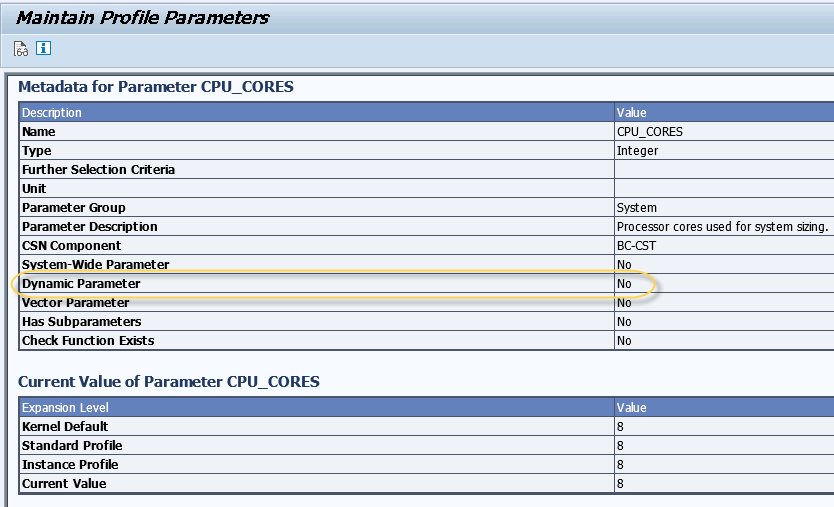
To determine whether a parameter is dynamic or static, you need to navigate to transaction RZ11. This transaction displays system parameters and their properties.
In the parameter details screen, look for the Dynamic field checkbox ?
- If the Dynamic field checkbox is checked, it indicates that the parameter is a dynamic parameter
- If the checkbox is not checked, it means the parameter is a static parameter
Understanding the Difference
Dynamic parameters can be changed during runtime without requiring a system restart. These changes take effect immediately or after a short delay.
Static parameters require a system restart for the changes to take effect. Modifying these parameters during runtime will not impact the current session.
Conclusion
Using transaction RZ11 provides a quick and reliable method to identify whether SAP system parameters are dynamic or static by checking the Dynamic field checkbox, which is essential for proper system administration and parameter management.

1K+ Views
