
Article Categories
- All Categories
-
 Data Structure
-
 Networking
-
 RDBMS
RDBMS
-
 Operating System
-
 Java
Java
-
 MS Excel
-
 iOS
iOS
-
 HTML
HTML
-
 CSS
CSS
-
 Android
-
 Python
-
 C Programming
-
 C++
C++
-
 C#
C#
-
 MongoDB
-
 MySQL
MySQL
-
 Javascript
-
 PHP
PHP
-
 Economics & Finance
Using DSN name while using a remote source in SAP HANA
In below SQL statement you have to define orcl_DSN_Name −
CREATE REMOTE SOURCE Source_Name
ADAPTER “odbc”
CONFIGURATION FILE ‘property_orcl.ini’
CONFIGURATION ‘DSN=oral_DSN_Name’
WITH CREDENTIAL TYPE ‘PASSWORD’
USING ‘user=username;password=password′;
In this SQL statement-
In above statement,
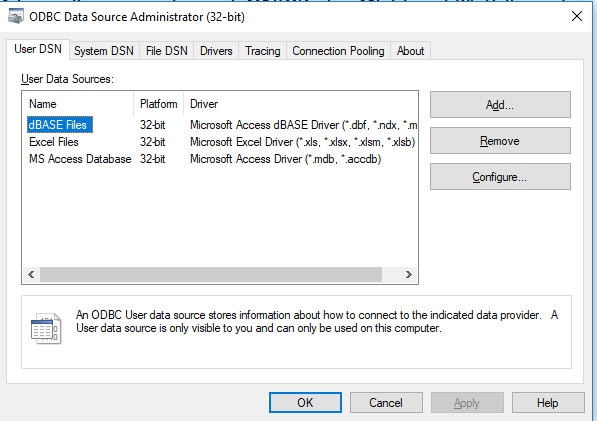
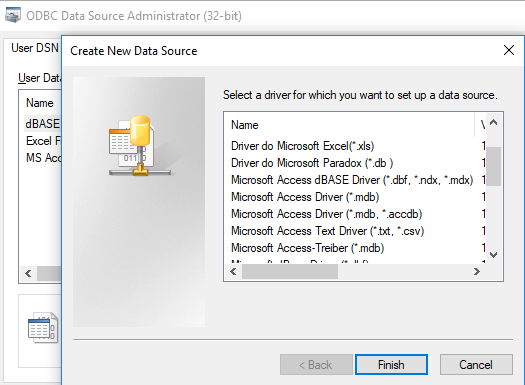
To create a new DSN, you have to click on Add button. Select the drivers from the list as per below. Click on Next
You can also configure an existing DSN by clicking on the Configure button. A user DSN is only visible to that user however System DSN is visible to all users of the system.

459 Views
