QlikView - Synthetic Key
ASynthtic Key is Qlikview's solution to create a artificial key when there is ambiguity about whoch key to use between two tables. This situation arises when two tables have two or more fields in common. QlikView's feature of creating association in memory automatically detects this scenario and creates an additional table which will hold the value of the new key created.
Input Data
Let's consider the following two csv data files which are used as input for further illustrations.
SalesRegion
ProductID,ProductCategory,Region,SaleAmount
1,Outdoor Recreation,Europe,4579
2,Clothing,Europe,4125
3,Costumes & Accessories,South Asia,6521
4,Athletics,South Asia,4125
5,Personal Care,Australia,5124
6,Arts & Entertainment,North AMerica,1245
7,Hardware,South America,456
8,Home & Garden,South America,241
9,Food,South Asia,1247
10,Home & Garden,South Asia,5462
11,Office Supplies,Australia,577

RegionCountry
Region,Country
Europe,Germany
Europe,Italy
South Asia,Singapore
South Asia,Korea
North AMerica,USA
South America,Brazil
South America,Peru
South Asia,China
South Asia,Sri Lanka

ProductCountry
ProductID, Country
3,Brazil
3,China
2,Korea
1,USA
2,Singapore
7,Sri Lanka
1,Italy
Load Script
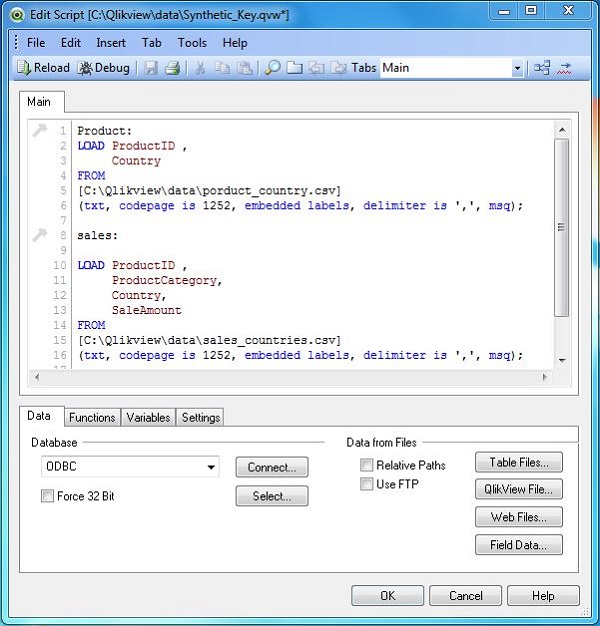
We load the above input data using the script editor which is invoked by pressing Control+E. Choose the option Table Files and browse for the Input file.
Data Model
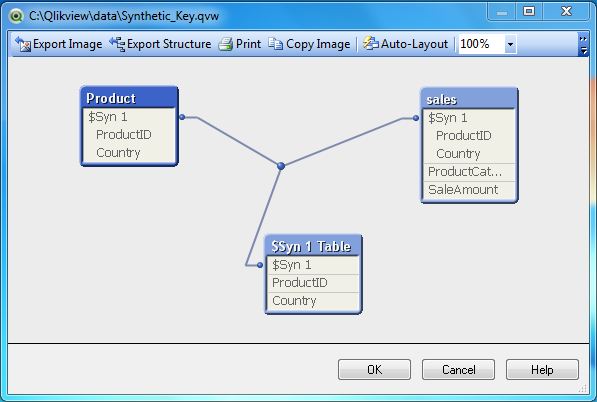
Next we look at the data model by using the menu command for table viewer - Control+T. The following screen comes up which shows the creation of a third table which supplies the value of the synthetic key as both the tables have ProductID and Country as matchign keys.
Impact of Synthetic key
Synthetic keys indicate the flaw in the data model that is being used. They do not cuase any issue in the correctness of the data or performance of the report. Things will work fine if a big data model has one or two instnaces of synthetic keys. But if we have too many of them, then that is a implicatoion to redesign the data model.