
- Python 3 - Home
- What is New in Python 3
- Python 3 - Overview
- Python 3 - Environment Setup
- Python 3 - Basic Syntax
- Python 3 - Variable Types
- Python 3 - Basic Operators
- Python 3 - Decision Making
- Python 3 - Loops
- Python 3 - Numbers
- Python 3 - Strings
- Python 3 - Lists
- Python 3 - Tuples
- Python 3 - Dictionary
- Python 3 - Date & Time
- Python 3 - Functions
- Python 3 - Modules
- Python 3 - Files I/O
- Python 3 - Exceptions
- Python 3 - Classes/Objects
- Python 3 - Reg Expressions
- Python 3 - CGI Programming
- Python 3 - Database Access
- Python 3 - Networking
- Python 3 - Sending Email
- Python 3 - Multithreading
- Python 3 - XML Processing
- Python 3 - GUI Programming
- Python 3 - Further Extensions
Python 3 - for Loop Statements
The for statement in Python has the ability to iterate over the items of any sequence, such as a list or a string.
Syntax
for iterating_var in sequence:
   statements(s)
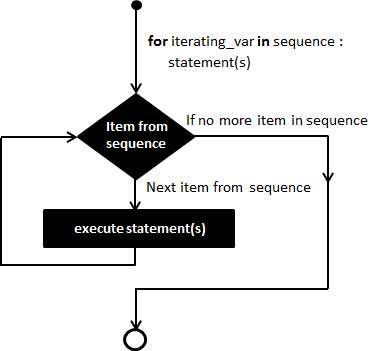
If a sequence contains an expression list, it is evaluated first. Then, the first item in the sequence is assigned to the iterating variable iterating_var. Next, the statements block is executed. Each item in the list is assigned to iterating_var, and the statement(s) block is executed until the entire sequence is exhausted.
Flow Diagram
The range() function
The built-in function range() is the right function to iterate over a sequence of numbers. It generates an iterator of arithmetic progressions.
Example
>>> range(5)
range(0, 5)
>>> list(range(5))
[0, 1, 2, 3, 4]
Example
range() generates an iterator to progress integers starting with 0 upto n-1. To obtain a list object of the sequence, it is typecasted to list(). Now this list can be iterated using the for statement.
>>> for var in list(range(5)):
   print (var)
Output
This will produce the following output.
0
1
2
3
4
Example
#!/usr/bin/python3

for letter in 'Python':     # traversal of a string sequence
   print ('Current Letter :', letter)
print()
fruits = ['banana', 'apple',  'mango']

for fruit in fruits:        # traversal of List sequence
   print ('Current fruit :', fruit)

print ("Good bye!")
Output
When the above code is executed, it produces the following result −
Current Letter : P
Current Letter : y
Current Letter : t
Current Letter : h
Current Letter : o
Current Letter : n

Current fruit : banana
Current fruit : apple
Current fruit : mango
Good bye!
Iterating by Sequence Index
An alternative way of iterating through each item is by index offset into the sequence itself. Following is a simple example −
Example
#!/usr/bin/python3

fruits = ['banana', 'apple',  'mango']
for index in range(len(fruits)):
   print ('Current fruit :', fruits[index])

print ("Good bye!")
Output
When the above code is executed, it produces the following result −
Current fruit : banana
Current fruit : apple
Current fruit : mango
Good bye!
Here, we took the assistance of the len() built-in function, which provides the total number of elements in the tuple as well as the range() built-in function to give us the actual sequence to iterate over.
Using else Statement with Loops
Python supports having an else statement associated with a loop statement.
If the else statement is used with a for loop, the else block is executed only if for loops terminates normally (and not by encountering break statement).
If the else statement is used with a while loop, the else statement is executed when the condition becomes false.
Example
The following example illustrates the combination of an else statement with a for statement that searches for even number in given list.
#!/usr/bin/python3

numbers = [11,33,55,39,55,75,37,21,23,41,13]

for num in numbers:
   if num%2 == 0:
      print ('the list contains an even number')
      break
else:
   print ('the list doesnot contain even number')
Output
When the above code is executed, it produces the following result −
the list does not contain even number