
Article Categories
- All Categories
-
 Data Structure
-
 Networking
-
 RDBMS
RDBMS
-
 Operating System
-
 Java
Java
-
 MS Excel
-
 iOS
iOS
-
 HTML
HTML
-
 CSS
CSS
-
 Android
-
 Python
-
 C Programming
-
 C++
C++
-
 C#
C#
-
 MongoDB
-
 MySQL
MySQL
-
 Javascript
-
 PHP
PHP
-
 Economics & Finance
Getting class of given method using T-code SE80 in SAP
To find the class of a given method in SAP, you need to use transaction code SE80 and navigate through the Repository Information System. This allows you to search for methods and identify which class they belong to.
Steps to Find Class of a Method
Follow these steps to locate the class containing a specific method ?
Step 1: Call transaction SE80 in the SAP system.
Step 2: Navigate to the Repository Info System from the main menu or toolbar.
Step 3: Under the Repository Info System, go to Class Library and then select Methods.
Step 4: In the selection screen, you can specify your search criteria under Standard Selections. Here you can enter ?
- Method name (if known)
- Class name pattern (using wildcards like *)
- Package or development class
- Other relevant selection criteria
Step 5: Execute the search to display the results showing methods along with their corresponding classes.
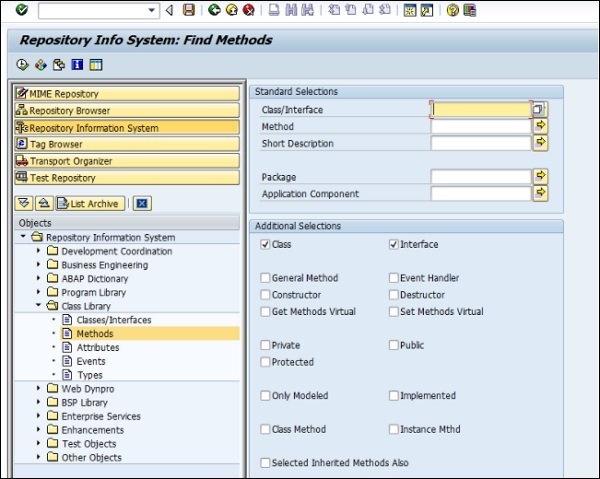
The search results will display a list showing the method names and their associated classes, making it easy to identify which class contains the method you're looking for.
Alternative Approach
You can also use the Find function (Ctrl+F) within SE80 when browsing the Object Navigator to search for specific methods across different classes and objects.
Conclusion
Using SE80's Repository Info System provides an efficient way to locate classes containing specific methods, helping developers navigate and understand the structure of SAP's object-oriented components.

3K+ Views
