
Article Categories
- All Categories
-
 Data Structure
-
 Networking
-
 RDBMS
RDBMS
-
 Operating System
-
 Java
Java
-
 MS Excel
-
 iOS
iOS
-
 HTML
HTML
-
 CSS
CSS
-
 Android
-
 Python
-
 C Programming
-
 C++
C++
-
 C#
C#
-
 MongoDB
-
 MySQL
MySQL
-
 Javascript
-
 PHP
PHP
-
 Economics & Finance
Creating a Dashboard from Webi Report
Yes, you can use Webi report in Dashboard using Web Service URL. You can use that URL in dashboard to integrate your reports seamlessly. To get the URL, you need to select the table in Webi report and then right-click to access the Publish option.
Steps to Create Dashboard from Webi Report
Follow these steps to publish your Webi report as a web service ?
- Open your Webi report in the Web Intelligence interface
- Select the table or chart you want to publish
- Right-click on the selected element
- Choose Publish from the context menu
- Configure the web service settings
- Copy the generated URL for dashboard integration
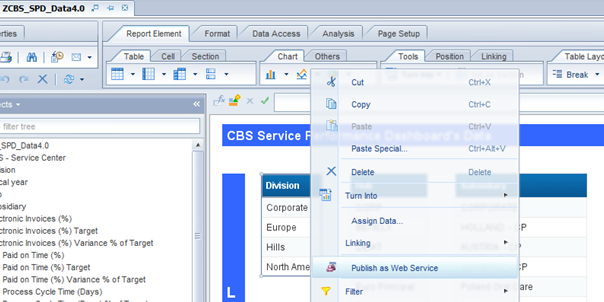
The publish dialog allows you to configure various settings for the web service. You can set parameters, define refresh schedules, and customize the output format according to your dashboard requirements.
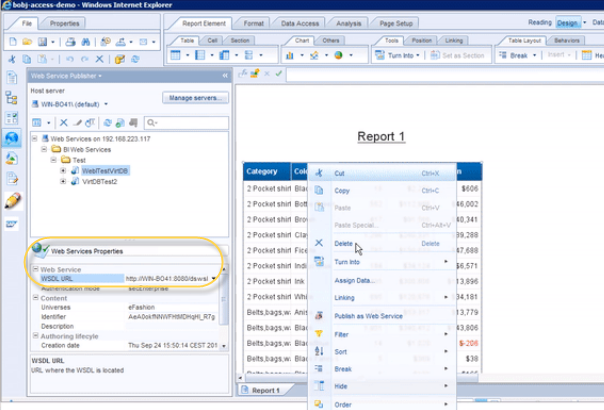
Benefits of Using Webi Reports in Dashboards
Integrating Webi reports into dashboards provides several advantages ?
- Real-time data ? Dashboards can display up-to-date information from your Webi reports
- Centralized view ? Combine multiple reports in a single dashboard interface
- Easy sharing ? Share dashboard URLs with stakeholders for quick access
- Responsive design ? Dashboards adapt to different screen sizes and devices
Conclusion
Creating dashboards from Webi reports using web service URLs is an effective way to share and display business intelligence data. This approach enables real-time data visualization and provides stakeholders with easy access to critical business metrics.

707 Views
