
Article Categories
- All Categories
-
 Data Structure
-
 Networking
-
 RDBMS
RDBMS
-
 Operating System
-
 Java
Java
-
 MS Excel
-
 iOS
iOS
-
 HTML
HTML
-
 CSS
CSS
-
 Android
-
 Python
-
 C Programming
-
 C++
C++
-
 C#
C#
-
 MongoDB
-
 MySQL
MySQL
-
 Javascript
-
 PHP
PHP
-
 Economics & Finance
Selected Reading
Timer in C++ using system calls
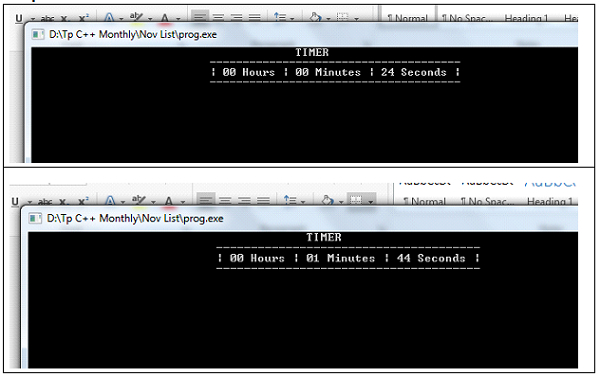
Here we will see how to design timer in C++ using a system call. We will not use any graphics or animations. Here timer means the stopwatch, that is up-counting the time. The used system calls are −
sleep(n) − This will help the program to sleep for n number of seconds
system() − This is used to execute the system command by passing command as an argument to this function.
Example
#include <iomanip>
#include <iostream>
#include <stdlib.h>
#include <unistd.h>
using namespace std;
int hrs = 0;
int mins = 0;
int sec = 0;
void showClk() {
   system("cls");
   cout << setfill(' ') << setw(55) << " TIMER \n";
   cout << setfill(' ') << setw(66) << " --------------------------------------\n";
   cout << setfill(' ') << setw(29);
   cout << "| " << setfill('0') << setw(2) << hrs << " Hours | ";
   cout << setfill('0') << setw(2) << mins << " Minutes | ";
   cout << setfill('0') << setw(2) << sec << " Seconds |" << endl;
   cout << setfill(' ') << setw(66) << " --------------------------------------\n";
}
void systemCallTimer() {
   while (true) {
      showClk();
      sleep(1);
      sec++;
      if (sec == 60) {
         mins++;
         if (mins == 60) {
            hrs++;
            mins = 0;
         }
         sec = 0;
      }
   }
}
int main() {
   systemCallTimer();
}
Output

Updated on: 2026-03-11T22:50:47+05:30
1K+ Views

Advertisements