
Article Categories
- All Categories
-
 Data Structure
-
 Networking
-
 RDBMS
RDBMS
-
 Operating System
-
 Java
Java
-
 MS Excel
-
 iOS
iOS
-
 HTML
HTML
-
 CSS
CSS
-
 Android
-
 Python
-
 C Programming
-
 C++
C++
-
 C#
C#
-
 MongoDB
-
 MySQL
MySQL
-
 Javascript
-
 PHP
PHP
-
 Economics & Finance
Selected Reading
Square and Square root in Arduino
Arduino has support for several popular math functions, square and square root being among them. Let’s look at the square root first.
Syntax
sqrt(x)
where x is a number of any data type. It returns a double.
For square, you ideally shouldn’t need a separate function. You can just multiply the number by itself.
x_squared = x*x;
However, Arduino does have a separate function for calculating squares. The syntax is −
sq(x) where x is a number of any data type. This again returns a double.
Example
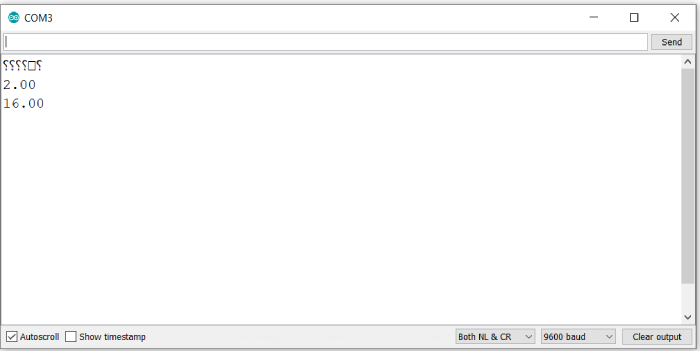
The following example illustrates the use of these functions −
void setup() {
   // put your setup code here, to run once:
   Serial.begin(9600);
   Serial.println();
   float x = 4.0;
   Serial.println(sqrt(x));
   Serial.println(sq(x));
}

void loop() {
   // put your main code here, to run repeatedly:
}
Output
The Serial Monitor output is shown below −

Updated on: 2021-05-29T14:02:50+05:30
5K+ Views

Advertisements