
Article Categories
- All Categories
-
 Data Structure
-
 Networking
-
 RDBMS
RDBMS
-
 Operating System
-
 Java
Java
-
 MS Excel
-
 iOS
iOS
-
 HTML
HTML
-
 CSS
CSS
-
 Android
-
 Python
-
 C Programming
-
 C++
C++
-
 C#
C#
-
 MongoDB
-
 MySQL
MySQL
-
 Javascript
-
 PHP
PHP
-
 Economics & Finance
Run SQL file in MySQL database from terminal?
To run SQL file in database, you need to use below syntax:
mysql -u yourUserName -p yourDatabaseName < yourFileName.sql
To understand the above syntax, let us open command prompt using windows+R shortcut key.
The snapshot is as follows:
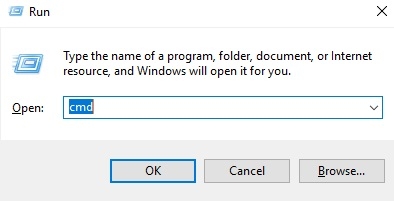
After pressing OK button, you will get a command prompt. The snapshot is as follows:

Now reach the bin directory, the snapshot is as follows:
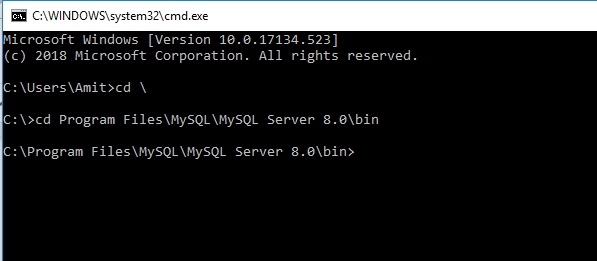
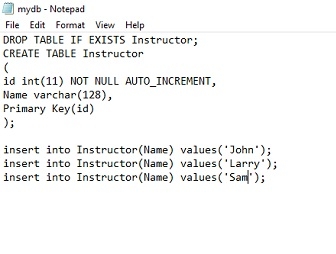
Here is my file ‘mydb.sql’ which is located in bin directory. The snapshot and content of SQL file is as follows:
Now you can type the above syntax which I have discussed to run SQL file. The snapshot of command is as follows:
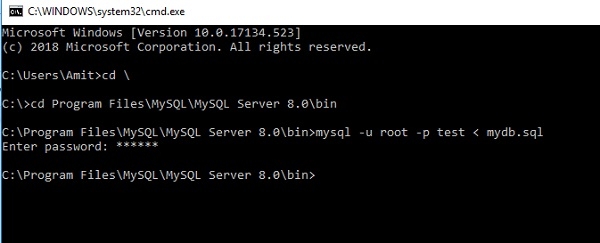
Now you can check the table ‘Instructor’ is created in database test or not.

Now switch to database test using USE command. The query is as follows:
mysql>Use test
Now check the table ‘Instructor’ is present in test database. The query is as follows:

Yes, we have Instructor table. Now we need to check the record is present or not which is inserted in the table. The query is as follows:
mysql> select *from instructor;
The following is the output:
+----+-------+
| id | Name  |
+----+-------+
|  1 | John  |
|  2 | Larry |
|  3 | Sam   |
+----+-------+
3 rows in set (0.00 sec)

7K+ Views
