
Article Categories
- All Categories
-
 Data Structure
-
 Networking
-
 RDBMS
RDBMS
-
 Operating System
-
 Java
Java
-
 MS Excel
-
 iOS
iOS
-
 HTML
HTML
-
 CSS
CSS
-
 Android
-
 Python
-
 C Programming
-
 C++
C++
-
 C#
C#
-
 MongoDB
-
 MySQL
MySQL
-
 Javascript
-
 PHP
PHP
-
 Economics & Finance
Selected Reading
Matplotlib Plots Lose Transparency When Saving as .ps/.eps
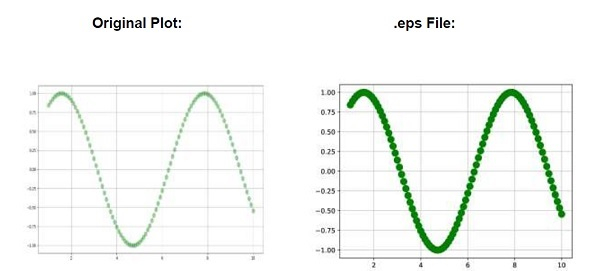
Whenever plots are saved in .eps/.ps, then the transparency of the plots get lost.
To compare them, we can take the following Steps −
Create x_data and y_data using numpy.
Plot x_data and y_data (Step 1), using the plot() method, with less aplha value, to make it more transparent.
Use the grid() method to prove the transparency of the line.
Save the created plot in .eps format.
To display the figure, use the show() method.
Example
import numpy as np
from matplotlib import pyplot as plt
plt.rcParams["figure.figsize"] = [7.50, 3.50]
plt.rcParams["figure.autolayout"] = True
x_data = np.linspace(1, 10, 100)
y_data = np.sin(x_data)
plt.plot(x_data, y_data, c='green', marker='o', alpha=.35, ms=10, lw=1)
plt.grid()
plt.savefig("lost_transparency_img.eps")
plt.show()
Output
The PostScript backend does not support transparency; partially transparent artists will be rendered opaque.

Updated on: 2021-04-10T08:01:27+05:30
2K+ Views

Advertisements