
Article Categories
- All Categories
-
 Data Structure
-
 Networking
-
 RDBMS
RDBMS
-
 Operating System
-
 Java
Java
-
 MS Excel
-
 iOS
iOS
-
 HTML
HTML
-
 CSS
CSS
-
 Android
-
 Python
-
 C Programming
-
 C++
C++
-
 C#
C#
-
 MongoDB
-
 MySQL
MySQL
-
 Javascript
-
 PHP
PHP
-
 Economics & Finance
Manually Generating GUID in Postman
We can manually generate GUID in Postman with the help of the steps listed below −
Step1 − Input the endpoint − https://www.tutorialspoint.com/index.htm in the address bar.

Step2 − Add the below script under the Pre-request Script tab −
var u= require('uuid')
var ud = u.v4()
console.log(ud)
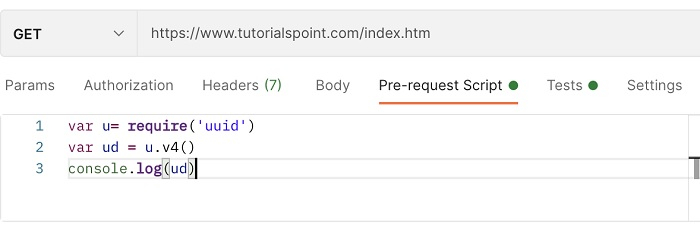
In the above script, require is used in JavaScript for loading a module. Then, the version 4 of the GUID is stored in the variable ud. Finally, the generated GUID is printed in the console.
It must be remembered that we cannot use a variable with name guid within a Pre-request Script in Postman. However, the guid can be used within headers, URL and Environment variables directly.
Step3 − Send the request by clicking the Send button.
Step4 − Open the Postman Console by clicking the View-> Show Postman Console.
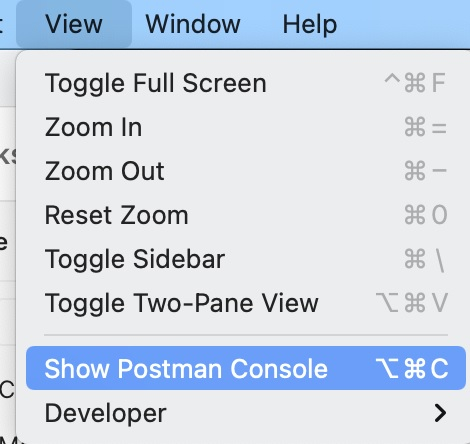
Step5 − It shall show the value of the u variable.
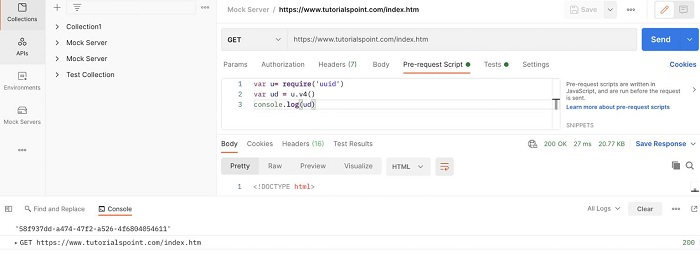
The GUID value obtained is − 58f937dd-a474-47f2-a526-4f6804054611.

4K+ Views
