
Article Categories
- All Categories
-
 Data Structure
-
 Networking
-
 RDBMS
RDBMS
-
 Operating System
-
 Java
Java
-
 MS Excel
-
 iOS
iOS
-
 HTML
HTML
-
 CSS
CSS
-
 Android
-
 Python
-
 C Programming
-
 C++
C++
-
 C#
C#
-
 MongoDB
-
 MySQL
MySQL
-
 Javascript
-
 PHP
PHP
-
 Economics & Finance
Selected Reading
Makefile for add, sub, mul, and div programs in C
What is a Makefile?
A makefile is a unique file used in many programming projects to produce executable programs automatically by compiling and linking them. It provides instructions on linking and compiling a program, along with a list of source file dependencies and building commands. The program called make is what reads a Makefile and runs the required commands.
General format of Makefile
- Specify the compiler (gcc for C programming and g++ for C++ programming).
- Specify the compiler flags.
- Define target executables.
- Define default target (all).
- Compile and link source files to executables.(can also be done using object files).
- Clean target to remove executable.
Lets see example of makefile for addition, subtraction, multiplication, and division programs in C.
Makefile for add, sub, mul, and div Programs
# Compiler to use<br>CC = gcc<br><br># Compiler flags<br>CFLAGS = -Wall -g<br><br># Target executable names<br>TARGETS = add sub mul div<br><br># Default target when running "make"<br>all: $(TARGETS)<br><br>run_add:add<br>@./add<br><br>run_sub:sub<br>@./sub<br><br>run_mul:mul<br>@./mul<br><br>run_div:div<br>@./div<br><br># Rule for creating the addition program<br>add: add.c<br>@$(CC) $(CFLAGS) -o add add.c<br><br># Rule for creating the subtraction program<br>sub: sub.c<br>@$(CC) $(CFLAGS) -o sub sub.c<br><br># Rule for creating the multiplication program<br>mul: mul.c<br>@$(CC) $(CFLAGS) -o mul mul.c<br><br># Rule for creating the division program<br>div: div.c<br>@$(CC) $(CFLAGS) -o div div.c<br><br># Clean up object files and executables<br>clean:<br>rm -f $(TARGETS)<br>
Makefile Execution Explanation
- CC = gcc: This line sets gcc as the compiler to be used for compiling the C programs.
- CFLAGS = -Wall -g: Here, -Wall enables all warnings which helps to identify potential issues in the code. -g generates debugging information with tools like gdb.
- Here, TARGETS is a variable which contains names of executables. later which we can refer to all targets with $(TARGETS) rather than typing each name repeatedly.
- all: This is the default target that runs when make is called without any specific instruction.
-
add: add.c: It defines the rule to compile add.c into an executable add
@$(CC) $(CFLAGS) -o add add.c runs the compiler command with gcc and specified flags (-Wall -g) to create the add executable. Similarly for other operations. - run_<operation> allows to compile and run each program run_add compiles add if it is not already built. ./add runs the add executable. @ is used before that to suppress the output. Similarly for other programs.
- clean target is used to remove the compiled executables.
Here are the programs for addition, subtraction, multiplication and division programs in C.
Program Files
add.c
#include <stdio.h>
int main() {
  int a, b;
  printf("Enter two integers to add: ");
  scanf("%d %d", &a, &b);
  printf("Sum: %d<br>", a + b);
  return 0;
}
sub.c
#include <stdio.h>
int main() {
  int a, b;
  printf("Enter two integers to subtract: ");
  scanf("%d %d", &a, &b);
  printf("Difference: %d<br>", a - b);
  return 0;
}
mul.c
#include <stdio.h>
int main() {
  int a, b;
  printf("Enter two integers to multiply: ");
  scanf("%d %d", &a, &b);
  printf("Product: %d<br>", a * b);
  return 0;
}
div.c
#include <stdio.h>
int main() {
  int a, b;
  printf("Enter two integers to divide: ");
  scanf("%d %d", &a, &b);
  if (b != 0)
    printf("Quotient: %d<br>", a / b);
  else
    printf("Error: Division by zero.<br>");
  return 0;
}
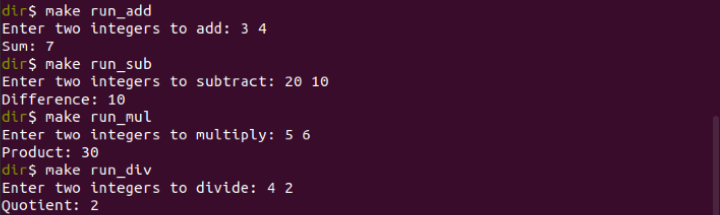
Here Makefile and its related programs are under one directory.

run make for specific operations.

Updated on: 2024-11-12T17:36:54+05:30
562 Views

Advertisements