
Article Categories
- All Categories
-
 Data Structure
-
 Networking
-
 RDBMS
RDBMS
-
 Operating System
-
 Java
Java
-
 MS Excel
-
 iOS
iOS
-
 HTML
HTML
-
 CSS
CSS
-
 Android
-
 Python
-
 C Programming
-
 C++
C++
-
 C#
C#
-
 MongoDB
-
 MySQL
MySQL
-
 Javascript
-
 PHP
PHP
-
 Economics & Finance
Joining cobk and coep table using Inner join taking too long
When joining COBK and COEP tables using inner join, performance issues can occur due to the large volume of data in these SAP controlling tables. This guide shows how to diagnose and improve query performance.
Checking Available Indexes
You can make use of T-Code: SE11 to check what indexes are available for table COEP. This transaction allows you to view the table structure and all existing indexes that can help optimize your queries.
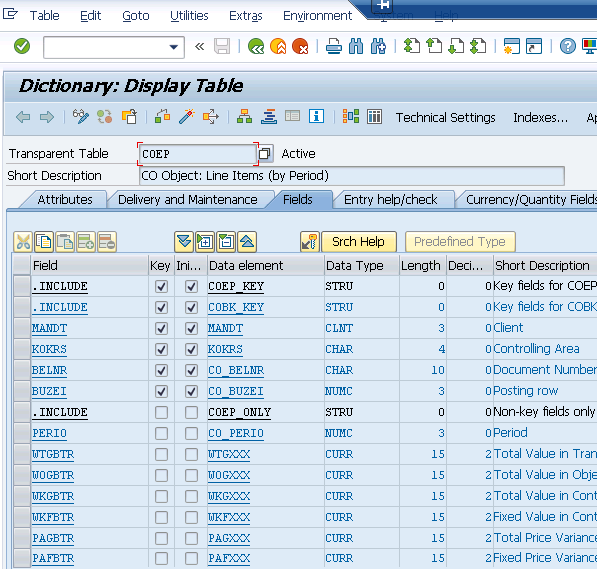
Testing Query Performance
For one COEP record that you have the (now) 5 criteria for, navigate to T-Code: SE16, pass the selections and run to check how long it takes. This will give you a baseline performance measurement before implementing optimizations.
Performance Optimization Techniques
To improve performance, you can implement the following strategies ?
Create Additional Indexes: You can create an additional index in table COEP based on the fields frequently used in your join conditions and WHERE clauses.
SQL Trace Analysis: You can also run a SQL trace in ST05 to see what indexes are used and if indexes are not improving performance as expected.
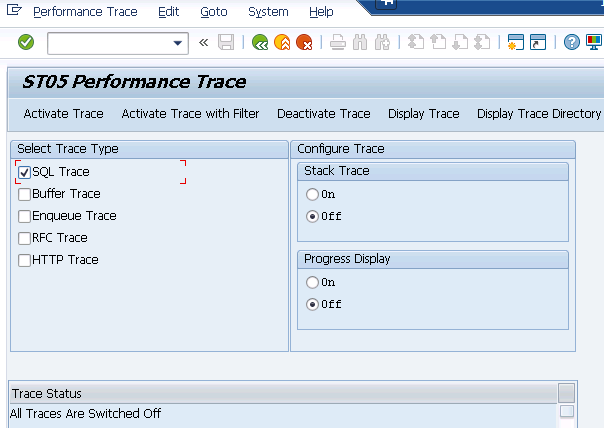
Using ST05 for SQL Trace
The SQL trace in ST05 provides detailed information about ?
- Which indexes are being utilized during query execution
- Database response times for each table access
- Recommendations for index creation or query optimization
Conclusion
Optimizing inner joins between COBK and COEP tables requires proper index analysis using SE11, performance testing with SE16, and SQL trace monitoring with ST05. Creating targeted indexes based on your specific join criteria will significantly improve query execution times.

881 Views
