
Article Categories
- All Categories
-
 Data Structure
-
 Networking
-
 RDBMS
RDBMS
-
 Operating System
-
 Java
Java
-
 MS Excel
-
 iOS
iOS
-
 HTML
HTML
-
 CSS
CSS
-
 Android
-
 Python
-
 C Programming
-
 C++
C++
-
 C#
C#
-
 MongoDB
-
 MySQL
MySQL
-
 Javascript
-
 PHP
PHP
-
 Economics & Finance
Selected Reading
Java Program to select all cells in a table
To select all cells in a table in Java Swing, you need to use the selectAll() method. Let’s say the following are our table rows and columns −
String[][] rec = {
   { "001", "Shirts", "40" },
   { "002", "Trousers", "250" },
   { "003", "Jeans", "25" },
   { "004", "Applicances", "90" },
   { "005", "Mobile Phones", "200" },
   { "006", "Hard Disk", "150" },
};
String[] header = { "ID", "Product", "Quantity" };
Set it for a table −
JTable table = new JTable(rec, header);
Now select all the rows and columns −
table.selectAll();
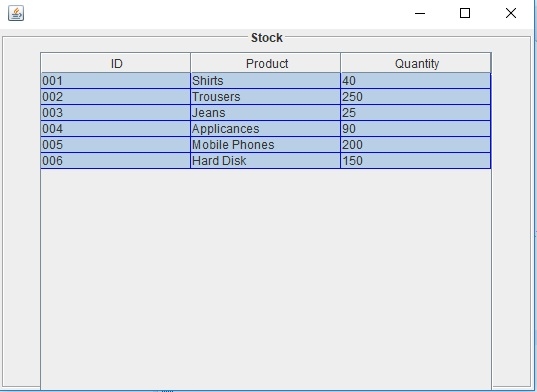
The following is an example to select all cells in a table −
Example
package my;
import java.awt.Color;
import javax.swing.BorderFactory;
import javax.swing.JFrame;
import javax.swing.JPanel;
import javax.swing.JScrollPane;
import javax.swing.JTable;
import javax.swing.border.TitledBorder;
public class SwingDemo {
   public static void main(String[] args) {
      JFrame frame = new JFrame();
      JPanel panel = new JPanel();
      panel.setBorder(BorderFactory.createTitledBorder(
         BorderFactory.createEtchedBorder(), "Stock", TitledBorder.CENTER, TitledBorder.TOP));
      String[][] rec = {
         { "001", "Shirts", "40" },
         { "002", "Trousers", "250" },
         { "003", "Jeans", "25" },
         { "004", "Applicances", "90" },
         { "005", "Mobile Phones", "200" },
         { "006", "Hard Disk", "150" },
      };
      String[] header = { "ID", "Product", "Quantity" };
      JTable table = new JTable(rec, header);
      table.setShowHorizontalLines(true);
      table.setGridColor(Color.blue);
      table.selectAll();
      panel.add(new JScrollPane(table));
      frame.add(panel);
      frame.setSize(550, 400);
      frame.setVisible(true);
   }
}
This will produce the following output −

Updated on: 2019-07-30T22:30:26+05:30
584 Views

Advertisements