
Article Categories
- All Categories
-
 Data Structure
-
 Networking
-
 RDBMS
RDBMS
-
 Operating System
-
 Java
Java
-
 MS Excel
-
 iOS
iOS
-
 HTML
HTML
-
 CSS
CSS
-
 Android
-
 Python
-
 C Programming
-
 C++
C++
-
 C#
C#
-
 MongoDB
-
 MySQL
MySQL
-
 Javascript
-
 PHP
PHP
-
 Economics & Finance
IntArray vs. Array in Kotlin
In this article, we will take an example to show the difference between IntArray and Array
IntArray in Kotlin
IntArray is a class in Kotlin representing the array of elements. Each instance of this class is represented as an integer array. To the constructor of this class you need to pass the number of elements you need in the array (size).
You can instantiate this class as shown below −
val myArray = IntArray(8)
By default, all the elements of the created array will be initialized to "0".
Example
The following program creates an array of integers by instantiating the IntArray class −
fun main(args: Array<String>) {
   // Creating an object of the IntArray class
   val myArray = IntArray(3)

   // Populating the array
   myArray[0] = 21;
   myArray[1] = 10;
   myArray[2] = 8;

   // Converting the array to string
   val res = myArray.joinToString()
   println("Contents of the created array: "+res)
}
Output
On executing the above program, it will generate the following output −
Contents of the created array: 21, 10, 8
Array in Kotlin
Array
val myArray = Array(3) {0}
By default, all the elements of the created array will be initialized to "0".
Example
The following program creates an array of integers by instantiating the Array class −
fun main(args: Array<String>) {
   // Creating an object of the Array class
   val myArray = Array(3) {0}

   // Populating the array
   myArray[0] = 101;
   myArray[1] = 330;
   myArray[2] = 8;

   // Converting the array to string
   val res = myArray.joinToString()
   println("Contents of the created array: "+res)
}
Output
On executing the above program, it will generate the following output −
Contents of the created array: 101, 330, 8
IntArray vs. Array
Internally, Array
Consider the following example −
// Creating an integer array using the IntArray class
val myArray1 = IntArray(1)

// Creating an integer array using the Array class
val myArray2 = Array(3){1}
You can compile this line and verify the bytecode of this using the javap command as −
> kotlinc Test.kt
> javap -c -p Testkt
Once you do that for the first statement, you can observe that internally a simple array is created.
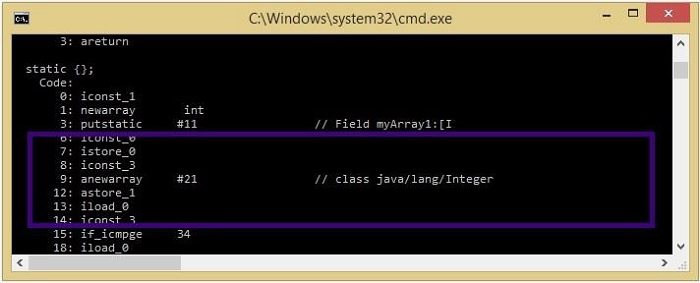
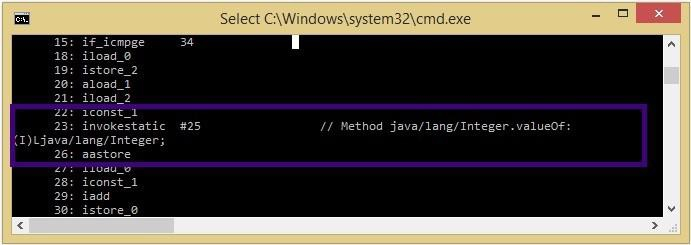
Whereas for the second statement, you can observe that the array was translated to an array of java.lang.Integer (Integer[]).

8K+ Views
