
Article Categories
- All Categories
-
 Data Structure
-
 Networking
-
 RDBMS
RDBMS
-
 Operating System
-
 Java
Java
-
 MS Excel
-
 iOS
iOS
-
 HTML
HTML
-
 CSS
CSS
-
 Android
-
 Python
-
 C Programming
-
 C++
C++
-
 C#
C#
-
 MongoDB
-
 MySQL
MySQL
-
 Javascript
-
 PHP
PHP
-
 Economics & Finance
Selected Reading
How to work the timezone using PowerShell?
To get the timezone of the System, you can use the Get-TimeZone command.
Example
PS C:\> Get-TimeZone

Id                         : Mountain Standard Time
DisplayName                : (UTC-07:00) Mountain Time (US & Canada)
StandardName               : Mountain Standard Time
DaylightName               : Mountain Daylight Time
BaseUtcOffset              : -07:00:00
SupportsDaylightSavingTime : True
To Set the TimeZone of the System, you can you the ID or the Name of the timezone.
Example
PS C:\> Set-TimeZone -Id "Pacific Standard Time" -PassThru
Id                         : Pacific Standard Time
DisplayName                : (UTC-08:00) Pacific Time (US & Canada)
StandardName               : Pacific Standard Time
DaylightName               : Pacific Daylight Time
BaseUtcOffset              : -08:00:00
SupportsDaylightSavingTime : True
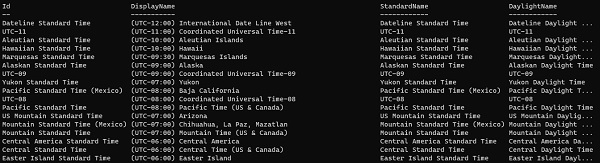
To retrieve the list of all the available timezones we need to use System.TimeZoneInfo .net class and method GetSystemTimeZones().
[System.TimeZoneInfo]::GetSystemTimeZones() |ft -AutoSize
Output

Updated on: 2020-11-09T09:36:22+05:30
1K+ Views

Advertisements