
Article Categories
- All Categories
-
 Data Structure
-
 Networking
-
 RDBMS
RDBMS
-
 Operating System
-
 Java
Java
-
 MS Excel
-
 iOS
iOS
-
 HTML
HTML
-
 CSS
CSS
-
 Android
-
 Python
-
 C Programming
-
 C++
C++
-
 C#
C#
-
 MongoDB
-
 MySQL
MySQL
-
 Javascript
-
 PHP
PHP
-
 Economics & Finance
Selected Reading
How to Use isControl() in Arduino?
The isControl() function is used to determine if a character is a control character. A control character or a non-printing character (NPC) is a code point (a number) in a character set that does not represent a written symbol. All entries in the ASCII table below code 32 are of this kind. This includes characters like '
', '\t', and so on.
Syntax
The syntax of the isControl function is as follows −
isControl(myChar)
Where myChar is the character being evaluated. If it is a control character, this function returns True, otherwise False.
Example
The following example illustrates how to use this function −
void setup() {
   Serial.begin(9600);
   Serial.println();
   char c1 = 'a';
   char c2 = '<br>';
   if (isControl(c1)) {
      Serial.println("c1 is a control char");
   } else {
      Serial.println("c1 is NOT a control char");
   }
   if (isControl(c2)) {
      Serial.println("c2 is a control char");
   } else {
      Serial.println("c2 is NOT a control char");
   }
}
void loop() {
}
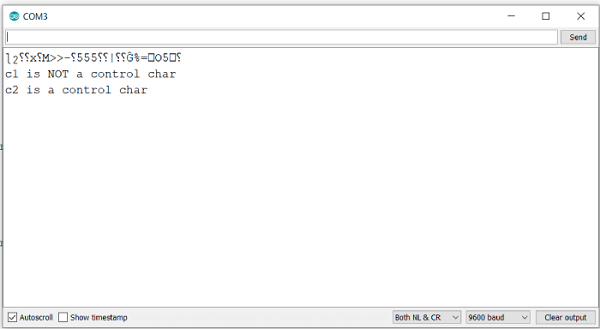
Output
The Serial Monitor output is shown below −

Updated on: 2021-07-24T14:02:04+05:30
965 Views

Advertisements