
Article Categories
- All Categories
-
 Data Structure
-
 Networking
-
 RDBMS
RDBMS
-
 Operating System
-
 Java
Java
-
 MS Excel
-
 iOS
iOS
-
 HTML
HTML
-
 CSS
CSS
-
 Android
-
 Python
-
 C Programming
-
 C++
C++
-
 C#
C#
-
 MongoDB
-
 MySQL
MySQL
-
 Javascript
-
 PHP
PHP
-
 Economics & Finance
Selected Reading
How to Stop the page loading in firefox programmatically in Selenium ?
We can stop the page loading in Firefox programmatically. This can be done by first setting page load time with the help of the pageLoadTimeout method.
The time to wait for the page load is passed as a parameter to that method.
Syntax
driver.manage().timeouts().pageLoadTimeout(10, TimeUnit.MILLISECONDS);
The page is forced to stop from loading with the help of the Javascript Executor. Selenium executes JavaScript command (window.stop() to stop page load) with the help of the executeScript method.
Syntax
((JavascriptExecutor)driver).executeScript("window.stop();");
Example
import org.openqa.selenium.By;
import org.openqa.selenium.WebDriver;
import org.openqa.selenium.WebElement;
import org.openqa.selenium.firefox.FirefoxDriver;
public class StopPageLdWait{
   public static void main(String[] args) {
      System.setProperty("webdriver.gecko.driver",
      "C:\Users\ghs6kor\Desktop\Java\geckodriver.exe");
      WebDriver driver = new FirefoxDriver();
      //apply page load time
      driver.manage().timeouts().pageLoadTimeout(1, TimeUnit.MILLISECONDS);
      driver.get("https://www.tutorialspoint.com/index.htm");
      for (int i = 0; i < 2; i++) {
         try {
            // launch page
            driver.get("https://www.tutorialspoint.com/index.htm");
            break;
         } catch (org.openqa.selenium.TimeoutException e) {
            //stopping page load
            ((JavascriptExecutor)driver)
            .executeScript("window.stop();");
            System.out.println("Page didnot load");
         }
      }
   }
}
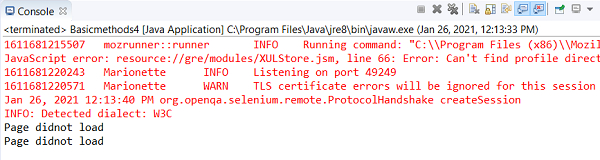
Output
Browser window

Updated on: 2021-02-02T12:41:38+05:30
587 Views

Advertisements