
Article Categories
- All Categories
-
 Data Structure
-
 Networking
-
 RDBMS
RDBMS
-
 Operating System
-
 Java
Java
-
 MS Excel
-
 iOS
iOS
-
 HTML
HTML
-
 CSS
CSS
-
 Android
-
 Python
-
 C Programming
-
 C++
C++
-
 C#
C#
-
 MongoDB
-
 MySQL
MySQL
-
 Javascript
-
 PHP
PHP
-
 Economics & Finance
Selected Reading
How to set Page Load Timeout using C# using Selenium WebDriver?
We can set page load timeout using Selenium webdriver in C# using the PageLoad method. It is used to set time to wait for loading of the page. An exception will be thrown if the page is not loaded within the timeout specified.
Syntax
driver.Manage().Timeouts().PageLoad = TimeSpan.FromSeconds(10);
Here, 10 is the amount of time in seconds.
Example
using NUnit.Framework;
using OpenQA.Selenium;
using OpenQA.Selenium.Firefox;
using System;
using OpenQA.Selenium;
namespace NUnitTestProject2{
   public class Tests{
      String url = "https://www.tutorialspoint.com/index.htm";
      IWebDriver driver;
      [SetUp]
      public void Setup(){
         //creating object of FirefoxDriver
         driver = new FirefoxDriver("");
      }
      [Test]
      public void Test2(){
         //set page load time for 15 secs
         driver.Manage().Timeouts().PageLoad = TimeSpan.
         FromSeconds(15);
         //URL launch
         driver.Navigate().GoToUrl(url);
         Console.WriteLine("Page loaded successfully");
      }
      [TearDown]
      public void close_Browser(){
         driver.Quit();
      }
   }
}
Output
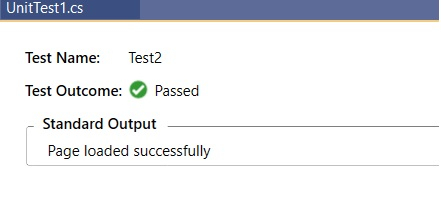

Updated on: 2021-04-07T08:39:38+05:30
3K+ Views

Advertisements