
Article Categories
- All Categories
-
 Data Structure
-
 Networking
-
 RDBMS
RDBMS
-
 Operating System
-
 Java
Java
-
 MS Excel
-
 iOS
iOS
-
 HTML
HTML
-
 CSS
CSS
-
 Android
-
 Python
-
 C Programming
-
 C++
C++
-
 C#
C#
-
 MongoDB
-
 MySQL
MySQL
-
 Javascript
-
 PHP
PHP
-
 Economics & Finance
Selected Reading
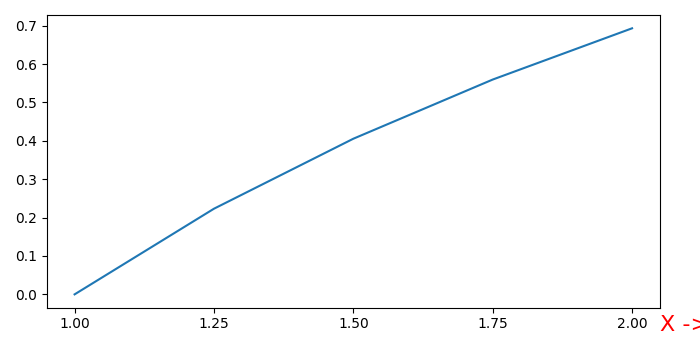
How to set my xlabel at the end of X-axis in Matplotlib?
To set the xlabel at the end of X-axis in matplotlib, we can take the following steps −
Create data points for x using numpy.
Using subplot() method, add a subplot to the current figure.
Plot x and log(x) using plot() method.
Set the label on X-axis using set_label() method, with fontsize=16, loc=left, and color=red.
To set the xlabel at the end of X-axis, use the coordinates, x and y.
To display the figure, use show() method.
Example
import numpy as np
from matplotlib import pyplot as plt
plt.rcParams["figure.figsize"] = [7.00, 3.50]
plt.rcParams["figure.autolayout"] = True
x = np.linspace(1, 2, 5)
ax = plt.subplot()
ax.plot(x, np.log(x))
ax.set_xticks(x)
label = ax.set_xlabel('X ->', fontsize=16, loc="left", c="red")
ax.xaxis.set_label_coords(1.0, -0.025)
plt.show()
Output

Updated on: 2021-05-06T13:28:01+05:30
10K+ Views

Advertisements