
Article Categories
- All Categories
-
 Data Structure
-
 Networking
-
 RDBMS
RDBMS
-
 Operating System
-
 Java
Java
-
 MS Excel
-
 iOS
iOS
-
 HTML
HTML
-
 CSS
CSS
-
 Android
-
 Python
-
 C Programming
-
 C++
C++
-
 C#
C#
-
 MongoDB
-
 MySQL
MySQL
-
 Javascript
-
 PHP
PHP
-
 Economics & Finance
Selected Reading
How to scroll up/down a page using Actions class in Selenium?
We can perform scroll up/down a page using Actions class in Selenium webdriver. First of all, we have to create an object of this Actions class and then apply the sendKeys method on it.
Now, to scroll down a page, we have to pass the parameter Keys.PAGE_DOWN to this method. To again scroll up a page, we have to pass the parameter Keys.PAGE_UP to the sendKeys method. Finally, we have to use the build and perform methods to actually perform this action.
Syntax
Actions a = new Actions(driver);
//scroll down a page
a.sendKeys(Keys.PAGE_DOWN).build().perform();
//scroll up a page
a.sendKeys(Keys.PAGE_UP).build().perform();
Example
import org.openqa.selenium.By;
import org.openqa.selenium.WebDriver;
import org.openqa.selenium.WebElement;
import org.openqa.selenium.firefox.FirefoxDriver;
import java.util.concurrent.TimeUnit;
import org.openqa.selenium.Keys;
import org.openqa.selenium.interactions.Action;
import org.openqa.selenium.interactions.Actions;
public class ScrollUpDownActions{
   public static void main(String[] args) {
      System.setProperty("webdriver.gecko.driver",
         "C:\Users\ghs6kor\Desktop\Java\geckodriver.exe");
      WebDriver driver = new FirefoxDriver();
      //implicit wait
      driver.manage().timeouts().implicitlyWait(5, TimeUnit.SECONDS);
      //URL launch
      driver.get("https://www.tutorialspoint.com/index.htm");
      // object of Actions class to scroll up and down
      Actions at = new Actions(driver);
      at.sendKeys(Keys.PAGE_DOWN).build().perform();
      //identify element on scroll down
      WebElement l = driver.findElement(By.linkText("Latest Courses"));
      String strn = l.getText();
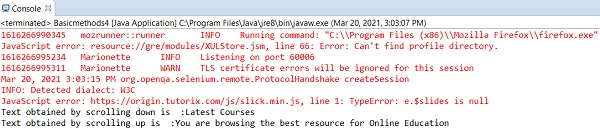
      System.out.println("Text obtained by scrolling down is :"+strn);

      at.sendKeys(Keys.PAGE_UP).build().perform();
      //identify element on scroll up
      WebElement m = driver.findElement(By.tagName("h4"));
      String s = m.getText();
      System.out.println("Text obtained by scrolling up is :"+s);
      driver.quit();
   }
}
Output

Updated on: 2021-04-07T08:14:47+05:30
12K+ Views

Advertisements