
Article Categories
- All Categories
-
 Data Structure
-
 Networking
-
 RDBMS
RDBMS
-
 Operating System
-
 Java
Java
-
 MS Excel
-
 iOS
iOS
-
 HTML
HTML
-
 CSS
CSS
-
 Android
-
 Python
-
 C Programming
-
 C++
C++
-
 C#
C#
-
 MongoDB
-
 MySQL
MySQL
-
 Javascript
-
 PHP
PHP
-
 Economics & Finance
How to run SQL script in MySQL?
To run SQL script in MySQL, use the MySQL workbench. First, you need to open MySQL workbench.
The snapshot is as follows −

Now, File -> Open SQL Script to open the SQL script.
Alternatively, use the following shortcut key −
Ctrl+Shift+O
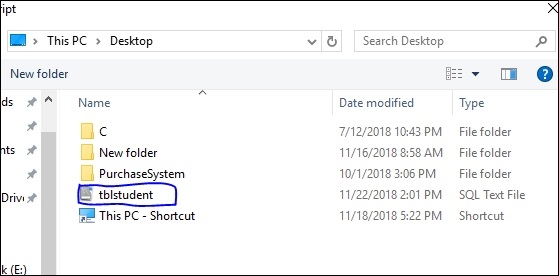
After that an option would be visible for you to choose your .sql file from the disk. In my system, the file is located on the Desktop. I will select the same “tblstudent” SQL file as shown in the following screenshot −
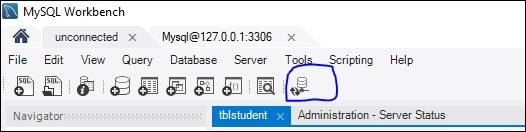
After browsing .sql files, you need to select the option “Reconnect to database” as shown in the following screenshot −
Now, it will ask for password to connect with MySQL. Add the password and click “OK” as in the following screenshot −
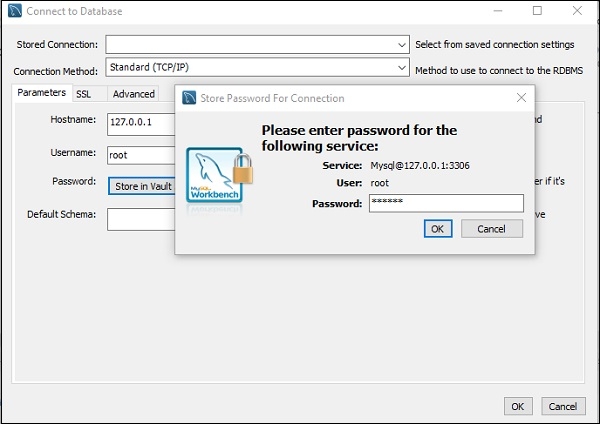
Note − Press OK button twice to connect with MySQL.
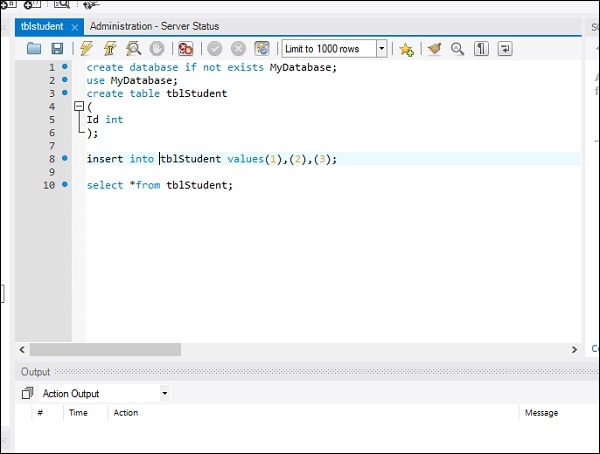
After completing the above process, the following screen will be visible with our SQL file “tblstudent”, which we uploaded before −
After that you need to execute the script. To execute the script, click the symbol marked in the following screenshot −

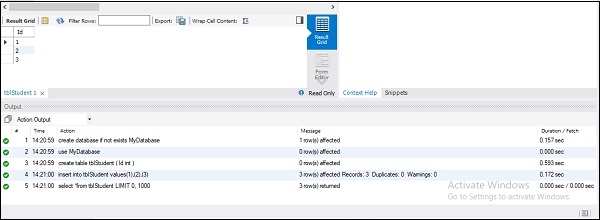
After that you will get the following output −

25K+ Views
