
Article Categories
- All Categories
-
 Data Structure
-
 Networking
-
 RDBMS
RDBMS
-
 Operating System
-
 Java
Java
-
 MS Excel
-
 iOS
iOS
-
 HTML
HTML
-
 CSS
CSS
-
 Android
-
 Python
-
 C Programming
-
 C++
C++
-
 C#
C#
-
 MongoDB
-
 MySQL
MySQL
-
 Javascript
-
 PHP
PHP
-
 Economics & Finance
How to Repeat a Character N Times in a Cell in Excel?
This practical tip can be used to format data, establish patterns, or simply add some visual components to your spreadsheets. There isn't a simple formula or function in Excel that lets you specify how many times a character should appear in a cell. However, we can easily complete this task using a creative mix of already-existing functions.
In this step-by-step tutorial, we'll use a straightforward example to show you how to repeat a character in a cell. Whether you are a novice or a seasoned Excel user, this course will accommodate all skill levels. Let's get started and discover how to add repeating characters to your Excel cells!
Repeat a Character N Times in a Cell
Here we will first get any one of the values, then use the autofill handle to complete the task. So let us see a simple process to know how you can repeat a character n times in a cell in Excel.
Step 1
Consider an Excel sheet where you have a list of items you want to repeat in a cell.
First, click on an empty cell and enter the formula as =REPT(A2, 4) and click enter to get the first value. In the formula, A2 is the cell value, and 4 represents repeating the value four times in a cell.
Empty Cell > Formula > Enter.

Step 2
Then drag down using the autofill handle. Then you will see that value repeated N times in a cell.
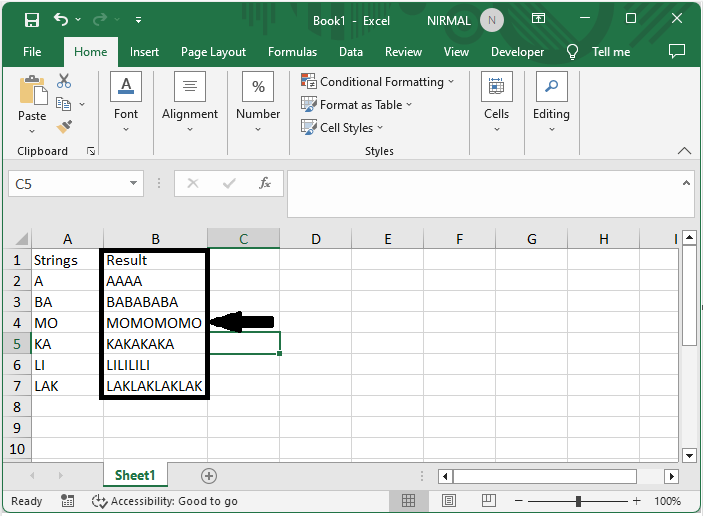
This is how you can repeat a character n times in Excel.
Conclusion
In this tutorial, we have used a simple example to demonstrate how you can repeat a character n times in a cell in Excel to highlight a particular set of data.

2K+ Views
