
Article Categories
- All Categories
-
 Data Structure
-
 Networking
-
 RDBMS
RDBMS
-
 Operating System
-
 Java
Java
-
 MS Excel
-
 iOS
iOS
-
 HTML
HTML
-
 CSS
CSS
-
 Android
-
 Python
-
 C Programming
-
 C++
C++
-
 C#
C#
-
 MongoDB
-
 MySQL
MySQL
-
 Javascript
-
 PHP
PHP
-
 Economics & Finance
How to read/write data from/to .properties file in Java?
The .properties is an extension in java which is used to store configurable application. It is represented by the Properties class in Java, you can store a properties file and read from it using the methods of this class. This class inherits the HashTable class.
Creating a .properties file −
To create a properties file −
Instantiate the Properties class.
Populate the created Properties object using the put() method.
Instantiate the FileOutputStream class by passing the path to store the file, as a parameter.
Example
The Following Java program creates a properties file in the path D:/ExampleDirectory/
import java.io.FileOutputStream;
import java.io.IOException;
import java.util.Properties;
public class CreatingPropertiesFile {
   public static void main(String args[]) throws IOException {
      //Instantiating the properties file
      Properties props = new Properties();
      //Populating the properties file
      props.put("Device_name", "OnePlus7");
      props.put("Android_version", "9");
      props.put("Model", "GM1901");
      props.put("CPU", "Snapdragon855");
      //Instantiating the FileInputStream for output file
      String path = "D:\ExampleDirectory\myFile.properties";
      FileOutputStream outputStrem = new FileOutputStream(path);
      //Storing the properties file
      props.store(outputStrem, "This is a sample properties file");
      System.out.println("Properties file created......");
   }
}
Output
Properties file created......
If you observe the output file you can see the created contents as −

Storing properties file in XML format
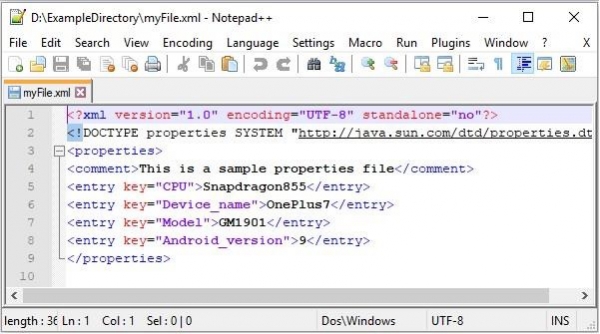
You can store the properties file in XML format using the stored XML() method.
Example
import java.io.FileOutputStream;
import java.io.IOException;
import java.util.Properties;
public class CreatingPropertiesFile {
   public static void main(String args[]) throws IOException {
      //Instantiating the properties file
      Properties props = new Properties();
      //Populating the properties file
      props.put("Device_name", "OnePlus7");
      props.put("Android_version", "9");
      props.put("Model", "GM1901");
      props.put("CPU", "Snapdragon855");
      //Instantiating the FileInputStream for output file
      String outputPath = "D:\ExampleDirectory\myFile.xml";
      FileOutputStream outputStrem = new FileOutputStream(outputPath);
      //Storing the properties file in XML format
      props.storeToXML(outputStrem, "This is a sample properties file");
      System.out.println("Properties file created......");
   }
}
Output
Properties file created......

12K+ Views
