
Article Categories
- All Categories
-
 Data Structure
-
 Networking
-
 RDBMS
RDBMS
-
 Operating System
-
 Java
Java
-
 MS Excel
-
 iOS
iOS
-
 HTML
HTML
-
 CSS
CSS
-
 Android
-
 Python
-
 C Programming
-
 C++
C++
-
 C#
C#
-
 MongoDB
-
 MySQL
MySQL
-
 Javascript
-
 PHP
PHP
-
 Economics & Finance
Selected Reading
How to open MySQL command line on Windows10?
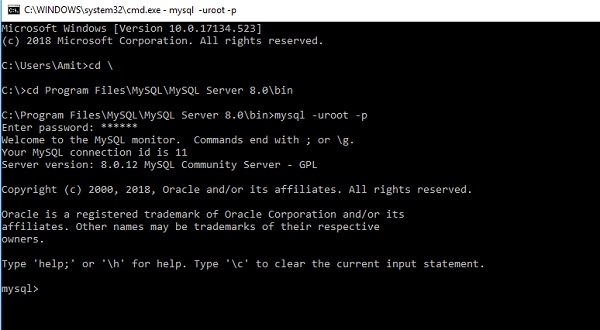
To open the MySQL command line from cmd, you need to use username root with your password.
Follow the below given steps. The syntax is as follows −
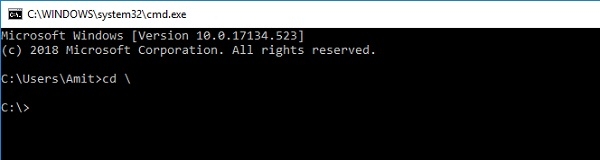
cd \> press enter key
cd Program Files\MySQL\MySQL Server 8.0\bin> press enter key
C:\Program Files\MySQL\MySQL Server 8.0\bin>mysql -uroot -p press enter key
Enter password: ******
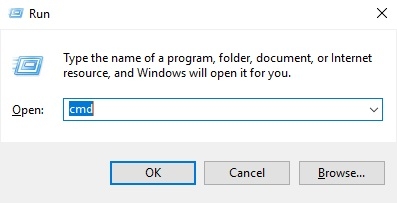
Here is the step by step instruction to open MySQL command line. First, Go to START > RUN or Open Run using Windows+R command −

Type CMD and hit OK button −
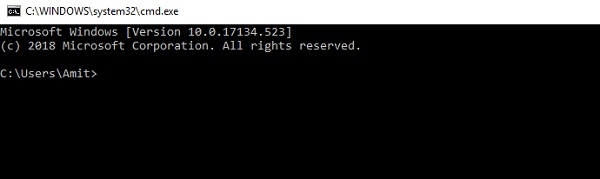
After pressing OK button, the CMD will open −
Now you need to follow the above instruction. First reach your bin directory and follow the below given steps −
Step 1 −
Step 2 −
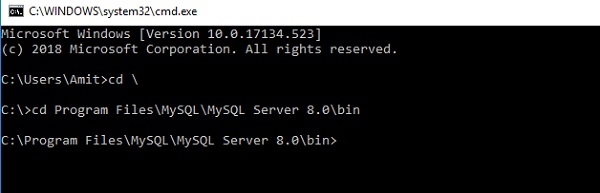
Now write the below command to open MySQL command line.
Step 3 −
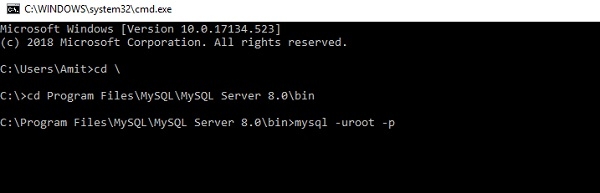
Now press the enter button.
Step 4 −
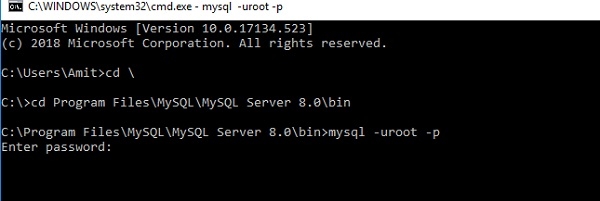
After that you need to provide the password.
Step 5 −
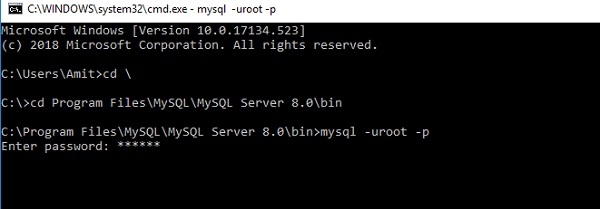
After that you need to press enter key to open the MySQL command line −

Updated on: 2020-06-30T12:38:34+05:30
25K+ Views

Advertisements