
Article Categories
- All Categories
-
 Data Structure
-
 Networking
-
 RDBMS
RDBMS
-
 Operating System
-
 Java
Java
-
 MS Excel
-
 iOS
iOS
-
 HTML
HTML
-
 CSS
CSS
-
 Android
-
 Python
-
 C Programming
-
 C++
C++
-
 C#
C#
-
 MongoDB
-
 MySQL
MySQL
-
 Javascript
-
 PHP
PHP
-
 Economics & Finance
Selected Reading
How to list the Azure VMs from the Availability set using PowerShell?
To list the Azure VMs under the availability set, we can use the command as shown below
Before running the command make sure that you are connected to the Azure Cloud (if not use ConnectAzAccount) and proper azure subscription (Set-AzContext to set the Azure subscription)
$availabilitySetVMs =
Get-AzAvailabilitySet -ResourceGroupName MYRESOURCEGROUPAVAILABILITY -Name
myAvailabilitySet
To get the total number of Virtual machines in the availability set,
PS C:\> $availabilitySetVMs.VirtualMachinesReferences.id.count
Output

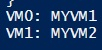
To get all the VM names from the list, we can use the below command.
$VMlist = Get-AzAvailabilitySet -ResourceGroupName
MYRESOURCEGROUPAVAILABILITY -Name myAvailabilitySet

$i=0

foreach($vm in $VMlist.VirtualMachinesReferences){
   "VM{0}: {1}" -f $i,($vm.Id.Split('/'))[-1]
   $i++
}
Output

Updated on: 2021-09-02T11:50:46+05:30
785 Views

Advertisements