
Article Categories
- All Categories
-
 Data Structure
-
 Networking
-
 RDBMS
RDBMS
-
 Operating System
-
 Java
Java
-
 MS Excel
-
 iOS
iOS
-
 HTML
HTML
-
 CSS
CSS
-
 Android
-
 Python
-
 C Programming
-
 C++
C++
-
 C#
C#
-
 MongoDB
-
 MySQL
MySQL
-
 Javascript
-
 PHP
PHP
-
 Economics & Finance
Selected Reading
How to iterate through and access the JSON array elements using Rest Assured?
We can iterate through and access the JSON array elements using Rest Assured. First, we shall obtain a Response body which is in JSON format from a request. Then convert it to string.
To obtain JSON array size, we have to use the size method on the JSON array. Then introduce a loop that shall iterate up to the array size. We shall send a GET request via Postman on a mock API, and observe the Response.
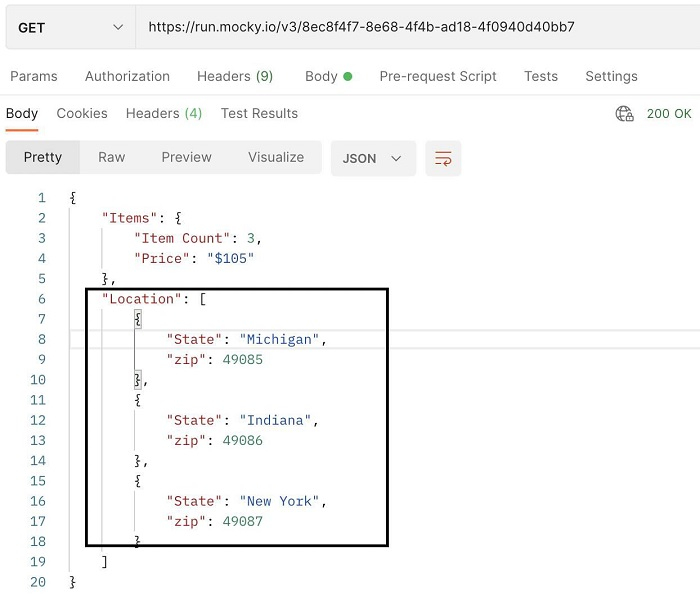
Using Rest Assured, let us get the value of the Location field having the values State and zip. They are a part of the JSON array - Location.
Example
Code Implementation
import static io.restassured.RestAssured.given;
import org.testng.annotations.Test;
import io.restassured.RestAssured;
import io.restassured.path.json.JsonPath;
import io.restassured.response.Response;
public class NewTest {
   @Test
   public void jsonIterateArr() {

      //base URI with Rest Assured class
      RestAssured.baseURI = "https://run.mocky.io/v3";

      //obtain Response from GET request
      Response res = given()
         .when()
         .get("/8ec8f4f7-8e68-4f4b-ad18-4f0940d40bb7");

      //convert JSON to string
      JsonPath j = new JsonPath(res.asString());

      //get values of JSON array after getting array size
      int s = j.getInt("Location.size()");
      for(int i = 0; i < s; i++) {
         String state = j.getString("Location["+i+"].State");
         String zip = j.getString("Location["+i+"].zip");
         System.out.println(state);
         System.out.println(zip);
      }
   }
}
Output
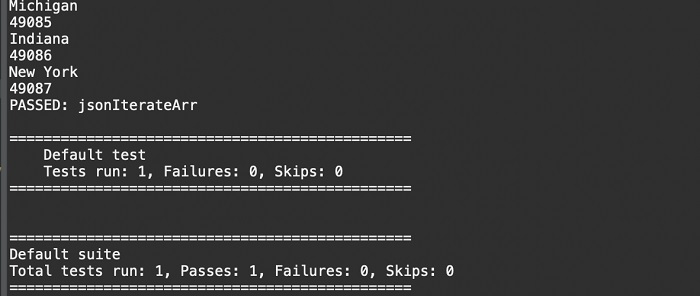

Updated on: 2021-11-17T12:46:27+05:30
12K+ Views

Advertisements