
Article Categories
- All Categories
-
 Data Structure
-
 Networking
-
 RDBMS
RDBMS
-
 Operating System
-
 Java
Java
-
 MS Excel
-
 iOS
iOS
-
 HTML
HTML
-
 CSS
CSS
-
 Android
-
 Python
-
 C Programming
-
 C++
C++
-
 C#
C#
-
 MongoDB
-
 MySQL
MySQL
-
 Javascript
-
 PHP
PHP
-
 Economics & Finance
Selected Reading
How to install Selenium package in Anaconda?
We can install the Selenium package in Anaconda. The conda has multiple packages so that it can be integrated with Selenium, Selenium-pytest, and so on from the below link − https://anaconda.org/search
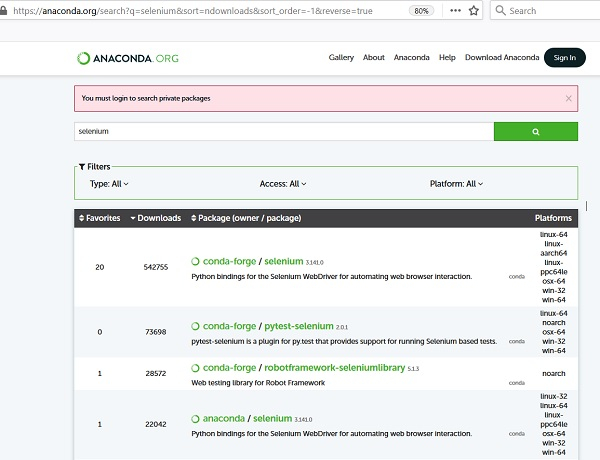
A conda is a command line tool in the form of a package which is used for Anaconda.
It has some similarities with pip. Selenium is present within the community based conda-forge channel available from the below link − https://anaconda.org/conda-forge/selenium
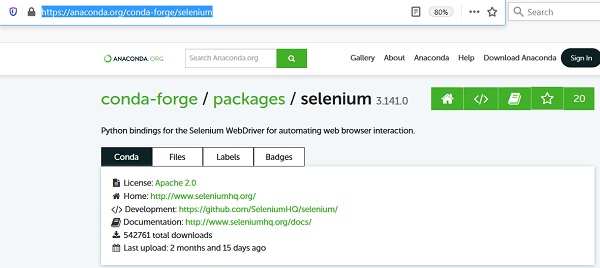
To complete installation of this package, we can execute any of the below commands −
conda install -c conda-forge selenium
conda install -c conda-forge/label/gcc7 selenium
conda install -c conda-forge/label/cf201901 selenium
conda install -c conda-forge/label/cf202003 selenium

Updated on: 2021-04-08T08:01:25+05:30
7K+ Views

Advertisements