
Article Categories
- All Categories
-
 Data Structure
-
 Networking
-
 RDBMS
RDBMS
-
 Operating System
-
 Java
Java
-
 MS Excel
-
 iOS
iOS
-
 HTML
HTML
-
 CSS
CSS
-
 Android
-
 Python
-
 C Programming
-
 C++
C++
-
 C#
C#
-
 MongoDB
-
 MySQL
MySQL
-
 Javascript
-
 PHP
PHP
-
 Economics & Finance
Selected Reading
How to implement tags in Cypress?
We can implement tags in Cypress. Cypress has tags - .only and .skip. While the .only tag is utilized to execute the it block to which it is tagged, the .skip tag is utilized to exclude the it block to which it is tagged.
Example
Implementation with .only
describe('Tutorialspoint', function()

   //it block with tag .only
   it.only('First Test', function() {
      cy.log("First Test")
   })

   //it block with tag .only
   It.only('Second Test', function() {
      cy.log("Second Test")
   })
   it('Third Test', function() {
      cy.log("Third Test")
   })
})
Execution Results
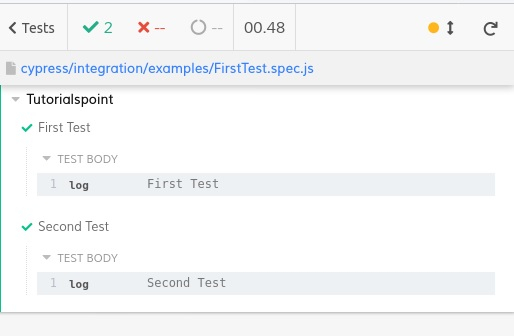
The output logs show that the it blocks (First and Second Test) with the .only tags only got executed.
Example
Implementation with .skip
describe('Tutorialspoint', function()
   it('First Test', function() {
      cy.log("First Test")
   })
   it('Second Test', function() {
      cy.log("Second Test")
   })

   //it block with tag .skip
   it.skip('Third Test', function() {
      cy.log("Third Test")
   })
})
Execution Result
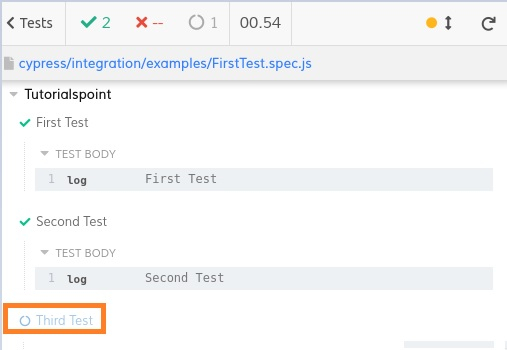
The output logs show that the it block (Third Test) with the .skip tag got skipped from the execution.

Updated on: 2021-11-19T10:43:30+05:30
1K+ Views

Advertisements