
Article Categories
- All Categories
-
 Data Structure
-
 Networking
-
 RDBMS
RDBMS
-
 Operating System
-
 Java
Java
-
 MS Excel
-
 iOS
iOS
-
 HTML
HTML
-
 CSS
CSS
-
 Android
-
 Python
-
 C Programming
-
 C++
C++
-
 C#
C#
-
 MongoDB
-
 MySQL
MySQL
-
 Javascript
-
 PHP
PHP
-
 Economics & Finance
Selected Reading
How to get the FPS value in OpenCV using C++?
To get the FPS value, we used the 'get()' command of and 'CAP_PROP_FPS' as the argument of the 'get()'. This argument returns the FPS in integer form.
At the starting of the program, we have taken an integer variable named 'FPS'. Then we used FPS = cap.get(CAP_PROP_FPS); to store the FPS value in the variable.
The following program gets the FPS of a video and shows it in the console window.
Example
#include<opencv2/opencv.hpp>//OpenCV header to use VideoCapture class//
#include<iostream>
using namespace std;
using namespace cv;
int main() {
   int FPS;//Declaring an integer variable to store the number of total frames//
   VideoCapture cap("video1.mp4");//Declaring an object to capture stream of frames from default camera//
   FPS = cap.get(CAP_PROP_FPS);//Getting the total number of frames//
   cout << "Total Number of frames are:" << FPS << endl;//Showing the number in console window//
   system("pause");//Pausing the system to see the result
   cap.release();//Releasing the buffer memory//
   return 0;
}
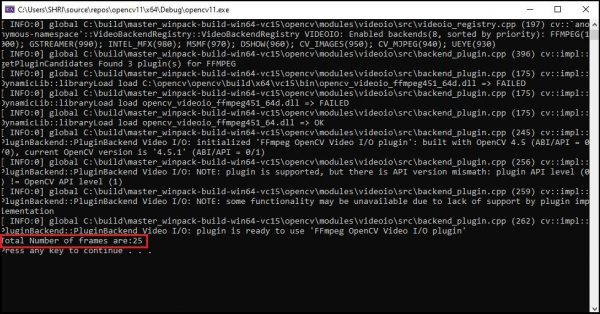
After launching this program, we will get the FPS value in the console window.
Output

Updated on: 2021-03-10T08:39:56+05:30
1K+ Views

Advertisements