
Article Categories
- All Categories
-
 Data Structure
-
 Networking
-
 RDBMS
RDBMS
-
 Operating System
-
 Java
Java
-
 MS Excel
-
 iOS
iOS
-
 HTML
HTML
-
 CSS
CSS
-
 Android
-
 Python
-
 C Programming
-
 C++
C++
-
 C#
C#
-
 MongoDB
-
 MySQL
MySQL
-
 Javascript
-
 PHP
PHP
-
 Economics & Finance
Selected Reading
How to get the folder size using PowerShell?
We will first retrieve the content of the folder using the Get-ChildItem command and then pipeline the Measure-Object command as shown below.
Get-ChildItem C:\Temp\ -Recurse | Measure-Object -Property Length -Sum
Output
Count : 1514
Average :
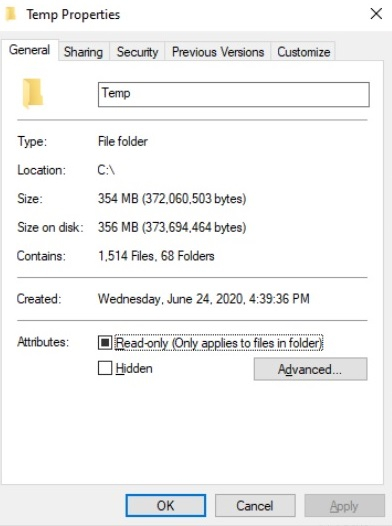
Sum : 372060503
Maximum :
Minimum :
Property : Length
So the above output shows that there is a total of 1514 files and folders and the sum shows the size of all the files and folders combined in KB. We can convert it to the MB as shown below.
(Get-ChildItem C:\Temp\ -Recurse | Measure-Object -Property Length -Sum).Sum / 1MB
354.824545860291
We can get the round figure,
[Math]::Round(
   ((Get-ChildItem C:\Temp\ -Recurse | Measure-Object -Property Length -Sum).Sum / 1MB),2
)
354.82
You can check the same on the folder path.

Updated on: 2021-03-30T13:58:01+05:30
5K+ Views

Advertisements