
Article Categories
- All Categories
-
 Data Structure
-
 Networking
-
 RDBMS
RDBMS
-
 Operating System
-
 Java
Java
-
 MS Excel
-
 iOS
iOS
-
 HTML
HTML
-
 CSS
CSS
-
 Android
-
 Python
-
 C Programming
-
 C++
C++
-
 C#
C#
-
 MongoDB
-
 MySQL
MySQL
-
 Javascript
-
 PHP
PHP
-
 Economics & Finance
Selected Reading
How to get/resolve the command from the alias in PowerShell?
To resolve the command name from given alias, you need to use the below command.
$Alias:AliasName
For example,
$Alias:dir
OR
$Alias:ls
Output
Get-ChildItem
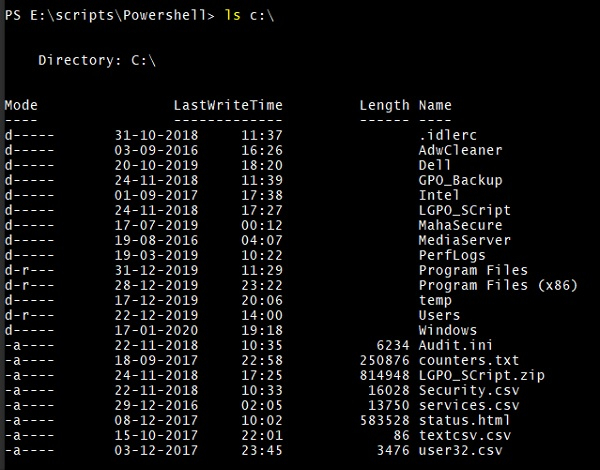
This means the above commands will provide the same result. For example, the output of the below commands would remain the same.
Get-ChildItem C:\
Dir C:\
ls C
Output
You can also use Get-Alias to resolve the alias name. For example,
Get-Alias -Name dir

Get-Alias -Name ls

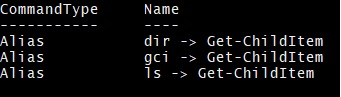
Until now we need to remember alias name to get the command and we were running individual commands to get the Alias and its command. It is possible to get all the alias names for the given command. To get all aliases for Get-ChildItem.
Get-Alias | where {$_.Definition -eq "Get-ChildItem"}
Output
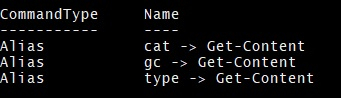
Get-Alias | where {$_.Definition -eq "Get-Content"}
Output

Updated on: 2020-02-14T08:03:32+05:30
540 Views

Advertisements