
Article Categories
- All Categories
-
 Data Structure
-
 Networking
-
 RDBMS
RDBMS
-
 Operating System
-
 Java
Java
-
 MS Excel
-
 iOS
iOS
-
 HTML
HTML
-
 CSS
CSS
-
 Android
-
 Python
-
 C Programming
-
 C++
C++
-
 C#
C#
-
 MongoDB
-
 MySQL
MySQL
-
 Javascript
-
 PHP
PHP
-
 Economics & Finance
Selected Reading
How to get process output in GridView format in PowerShell ?
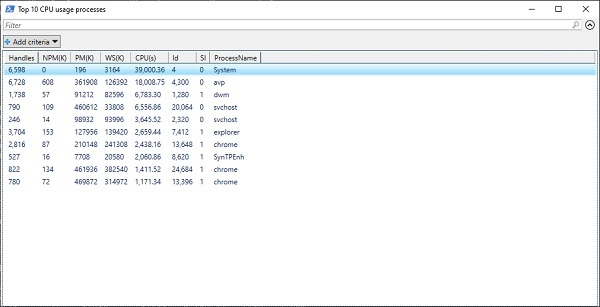
To get the output in gridview format in PowerShell, you need to Pipeline the Out-GridView variable so the output will be in GUI format.
Command
Get-Process | Sort-Object CPU -Descending | Select -First 10 | Out-GridView -Title "Top 10 CPU usage processes"

Updated on: 2020-01-22T12:24:51+05:30
826 Views

Advertisements